Signing blind
A wallet pop-up asks you to approve a transaction you can't read. Most people approve and hope it is what the site said.
01
 Free for Windows, macOS & Linux · v1.0.1
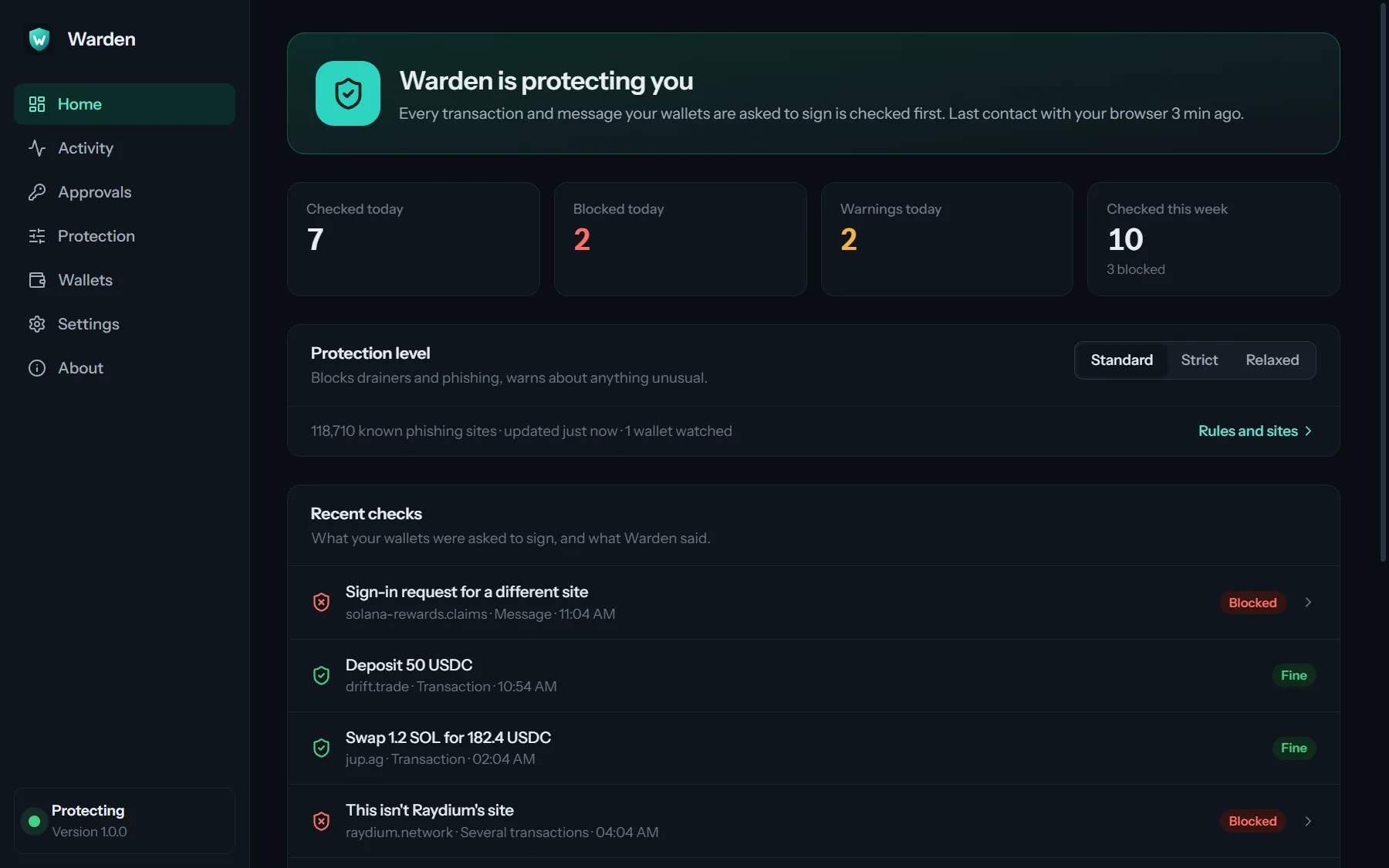
Before your wallet signs anything, Warden runs the transaction on your own computer and tells you what would really happen. Drainers, phishing sites and address poisoning are stopped before you sign.
Signing on Solana
Wallet pop-ups ask you to approve what you can't read, on sites that look exactly like the real ones. Warden reads it for you, every time, before your wallet signs.
A wallet pop-up asks you to approve a transaction you can't read. Most people approve and hope it is what the site said.
01One signature hands a token account or an unlimited spending permission to someone else. The wallet is emptied later, quietly.
02A copied page, a familiar logo and a Connect button, on an address that is one letter off.
03A fake address that starts and ends like one you use sits in your history, waiting for you to copy it.
04How it works
Keep the wallet you use. Warden checks what it is asked to sign.
The desktop app does the checking. It starts with your computer and lives quietly in the tray.
For Chrome, Edge, Brave or Firefox. It finds the app on its own: nothing to pair or configure.
Each request is checked in about a third of a second. Safe ones go straight to your wallet; you only hear from Warden when something is wrong.
What Warden stops
These screenshots are the real app and extension, checking real Solana mainnet data.
Every signature
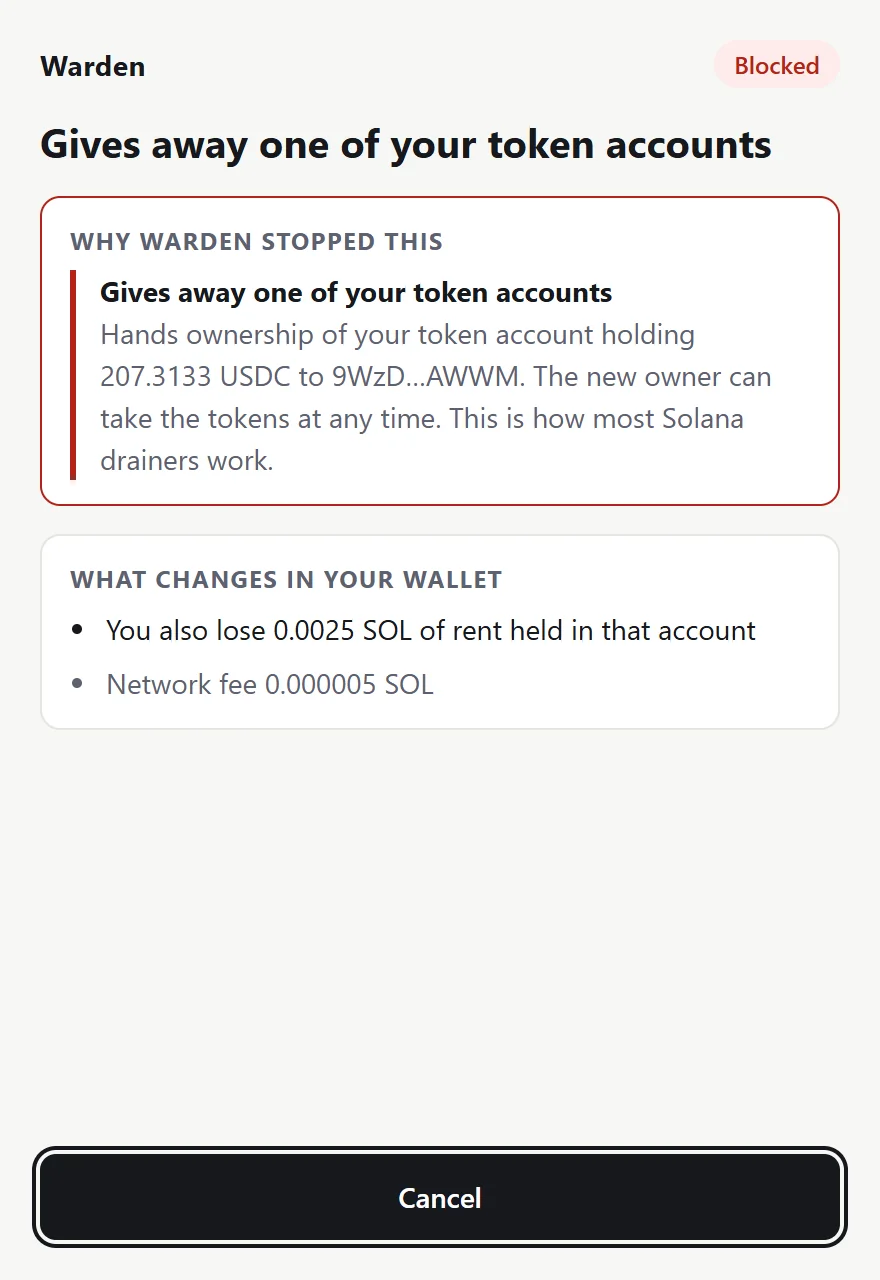
When a site asks your wallet to sign, Warden runs the transaction in a private copy of Solana on your computer, with current account data, and looks at what would really change. A drainer asking for your token account is stopped, with the reason in plain words. A normal swap goes straight through.
Phishing sites
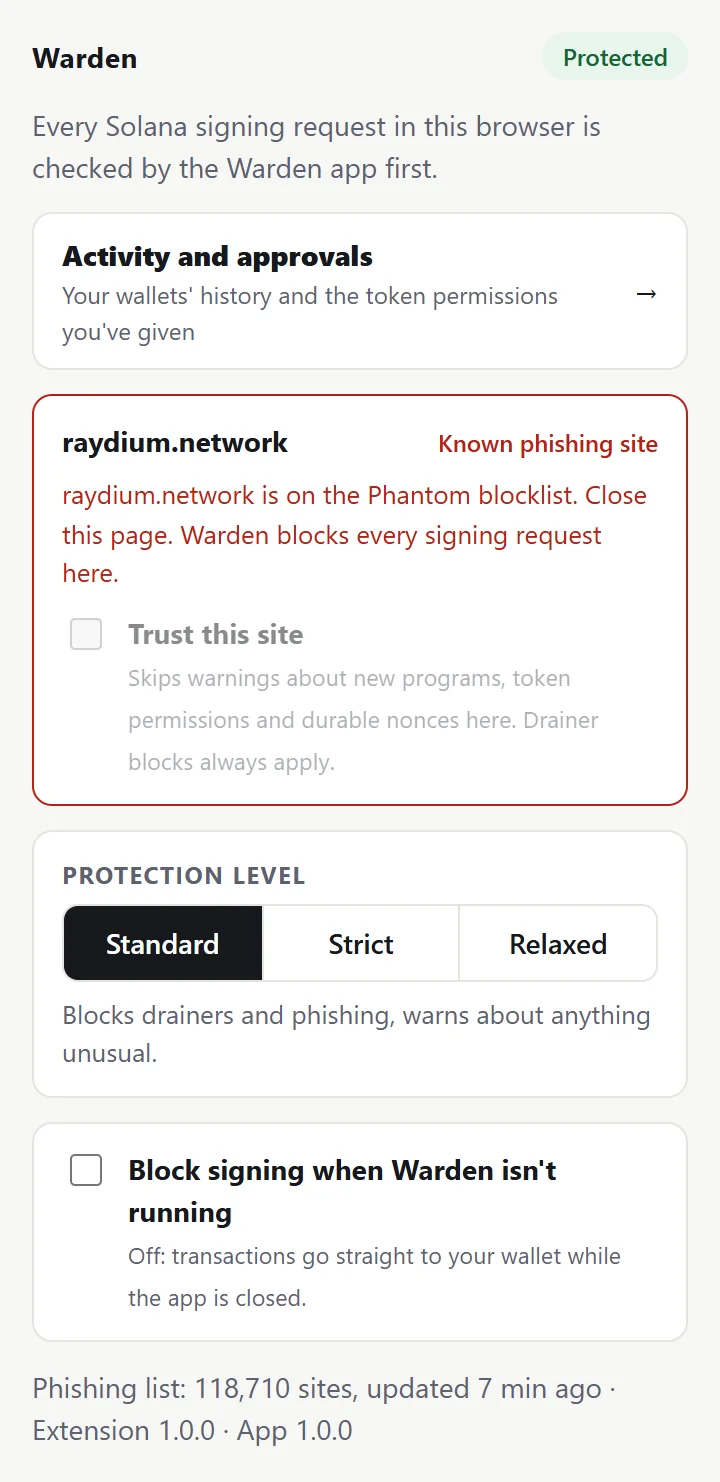
Every page is checked against more than 118,000 known phishing sites from the MetaMask and Phantom lists, downloaded to your computer and refreshed every six hours. Warden's own check also spots sites imitating 17 Solana brands, like raydium.network, before any list has them.
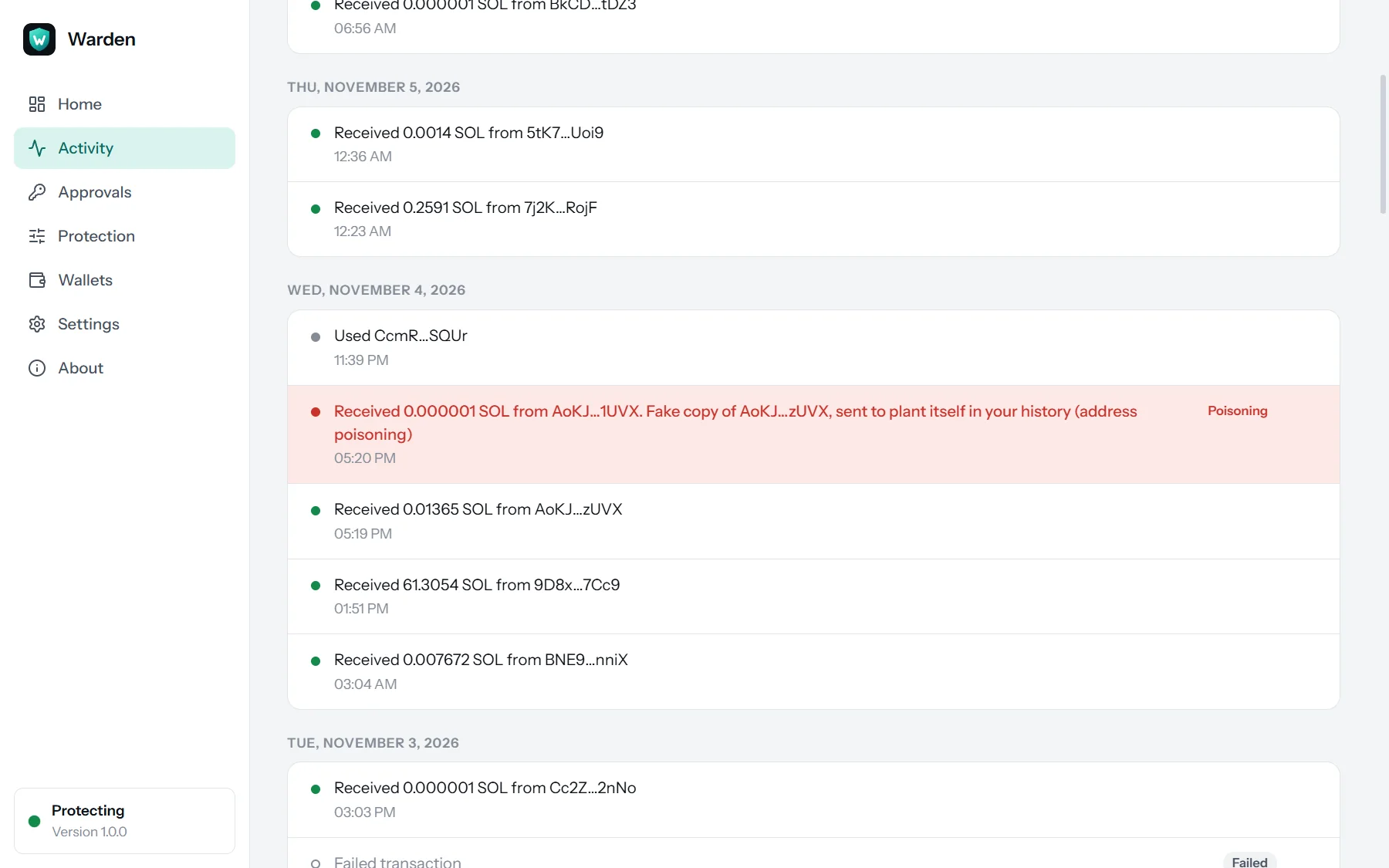
Address poisoning
Scammers make addresses that start and end like the ones you use, then send you a tiny amount so the fake lands in your history. Warden keeps the history of your wallets and blocks payments to a lookalike. The one shown here is real: it reached a test wallet a minute after the genuine address paid it.
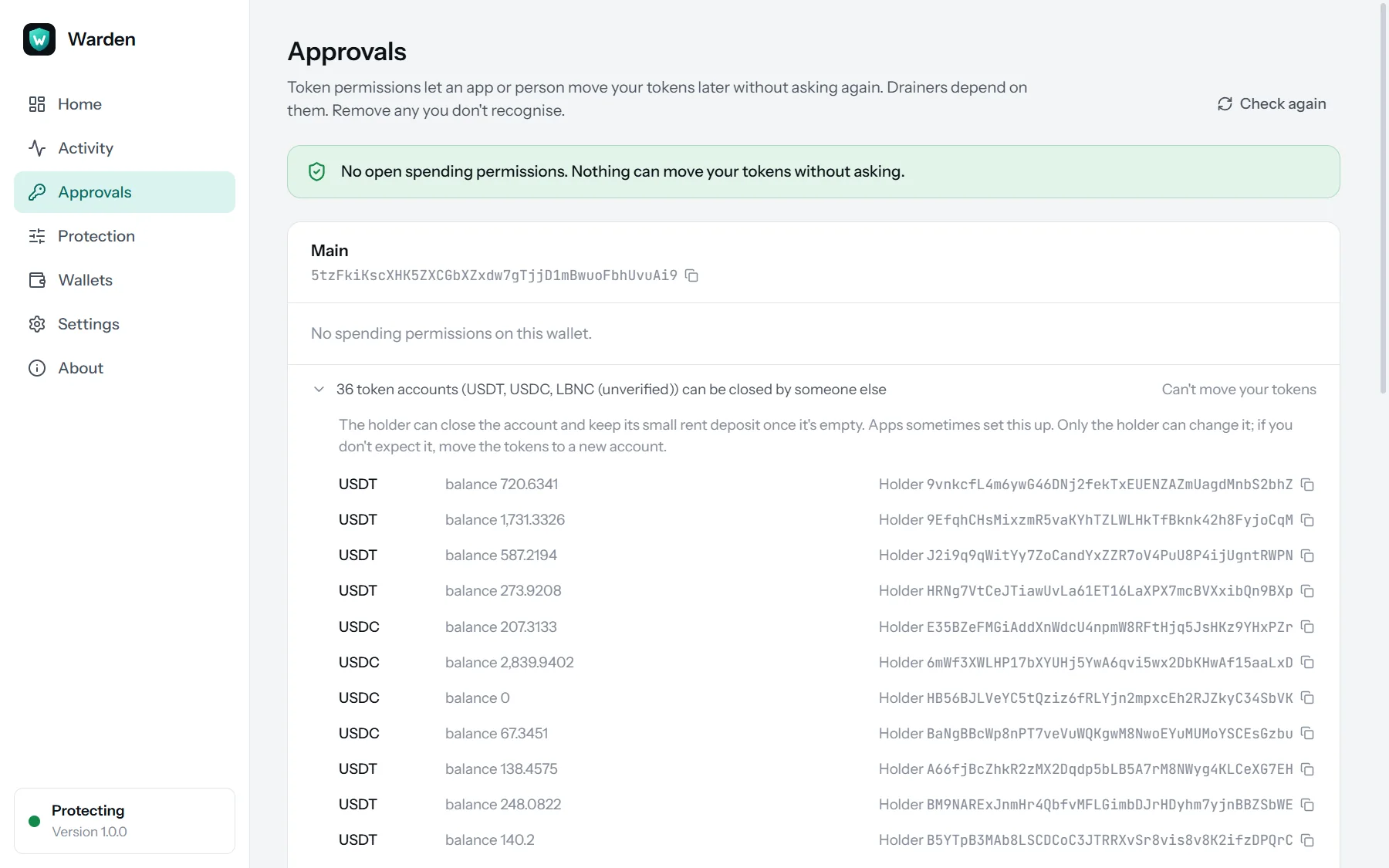
Token permissions
Apps can ask your wallet for permission to move a token later without asking again. Drainers depend on it. Warden lists every permission on your wallets, read from the chain, and removes the ones you pick: your own wallet signs the removal, and Warden checks that too.
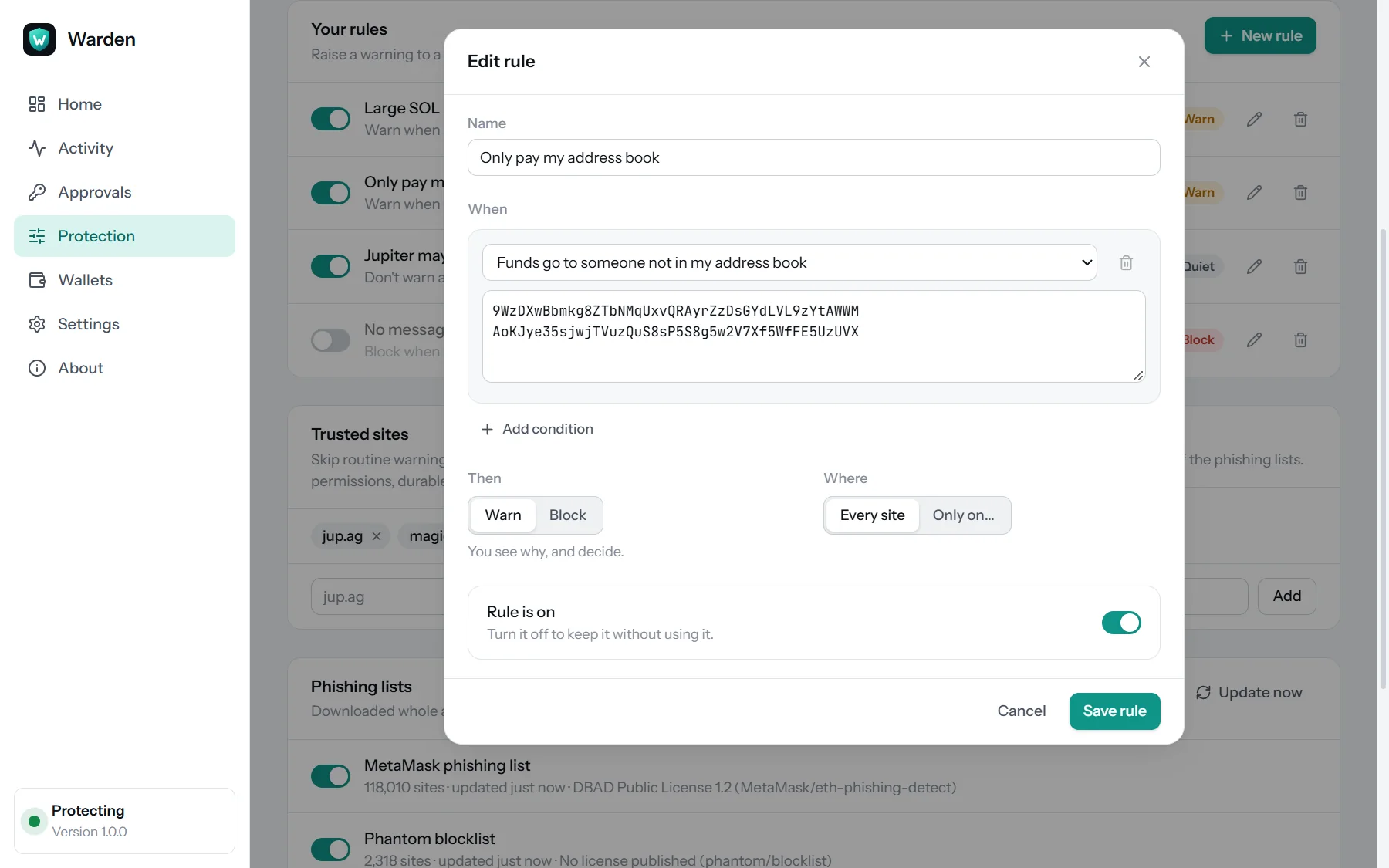
Your rules
Three protection levels cover most people. For the rest, build rules from plain choices: warn when more than 5 SOL leaves, only pay my address book, never give token permissions, no message signing on new sites.
Works with
Warden has been tested against the real Phantom, Solflare and Backpack extensions, including the older ways sites talk to them, so a phishing page can't slip past by asking the old way.
Everything else you'd expect
Solana's public endpoint to start, or your own Helius, Triton or QuickNode key for speed. Tested before it is used.
Protection only works while the app runs, so it starts quietly in the tray.
If the app isn't running, signing either goes through as usual or is blocked. You decide.
In the app, and on a private page in your browser that only Warden can open.
No program IDs or instruction dumps: what you send, what you get, and why something is wrong.
Themes that follow your system.
Private by design
Get Warden 1.0.1 · Free
Pick the file for your system. We'll email you a one-time code, and the download starts as soon as you enter it. Then add the browser extension.
Windows 10 and 11, 64-bit
macOS 11 Big Sur or later
64-bit (x86_64)
First launch
If Windows shows "Windows protected your PC", choose More info, then Run anyway. On Windows 10, the installer adds Microsoft's WebView2 if it's missing.
Drag Warden into Applications. The first time, open System Settings, then Privacy & Security, and click Open Anyway. (On macOS 14 and earlier, right-click the app and choose Open.)
Install the .deb with apt or the .rpm with dnf, like any other package. The AppImage needs no install: make it executable (chmod +x) and run it.
Add the browser extension below. Warden sets up the connection to your browsers by itself.
The first-launch warning appears because Warden is new and not yet widely downloaded; it only shows once. Updating: download the new version from this page and install it over the old one. Your settings, rules and wallet history are kept. Verify your download (optional): each file's SHA-256 checksum is in SHA256SUMS.txt.
Browser extension
The extension catches signing requests and asks the Warden app on your computer. Install the app first.
The extension sends nothing to any server. Privacy policy
FAQ
Something else? Ideas or partnership enquiries? Email jamal@unravelers.tech.
Yes. Every feature, for as many wallets as you like, with no account.
No. Warden never asks for keys or seed phrases and can't sign anything. It only tells your wallet whether a request may go ahead. Wallet history is read from public chain data.
Phantom, Solflare and Backpack are tested, and other Solana wallet extensions that follow the Wallet Standard work too. Web wallets that sign inside their own website aren't covered.
Yes. The extension catches signing requests in your browser; the app checks them. The extension does nothing on its own, and the app sets up the connection to your browsers by itself.
By default, signing goes through as it would without Warden, and the toolbar icon shows OFF. Turn on "Block signing when Warden isn't running" in the extension to stop signing instead.
A transaction check takes about a third of a second; messages are checked instantly. Safe requests reach your wallet without any extra window.
Which accounts Warden reads to simulate a transaction, as your wallet's RPC already does. Never your keys or the transaction itself. Use your own RPC if you prefer.
Warnings explain why and let you continue. Trust a site to skip routine warnings there, or add an exception if a phishing list got it wrong. Drainer blocks can't be overridden by rules.
Download them from this page and install over the old one. Your settings, rules and wallet history are kept.
Both systems double-check apps that aren't yet widely downloaded. It only happens on the first launch; the steps are in the download section above.
Before your next signature
Warden is free for Windows, macOS and Linux. Install it, add the extension, and keep using your wallet as before.