Lists that are stale before you buy them
Bought lead lists are shared with everyone else who paid for them, full of people who left, addresses that bounce and businesses that closed last year.
01
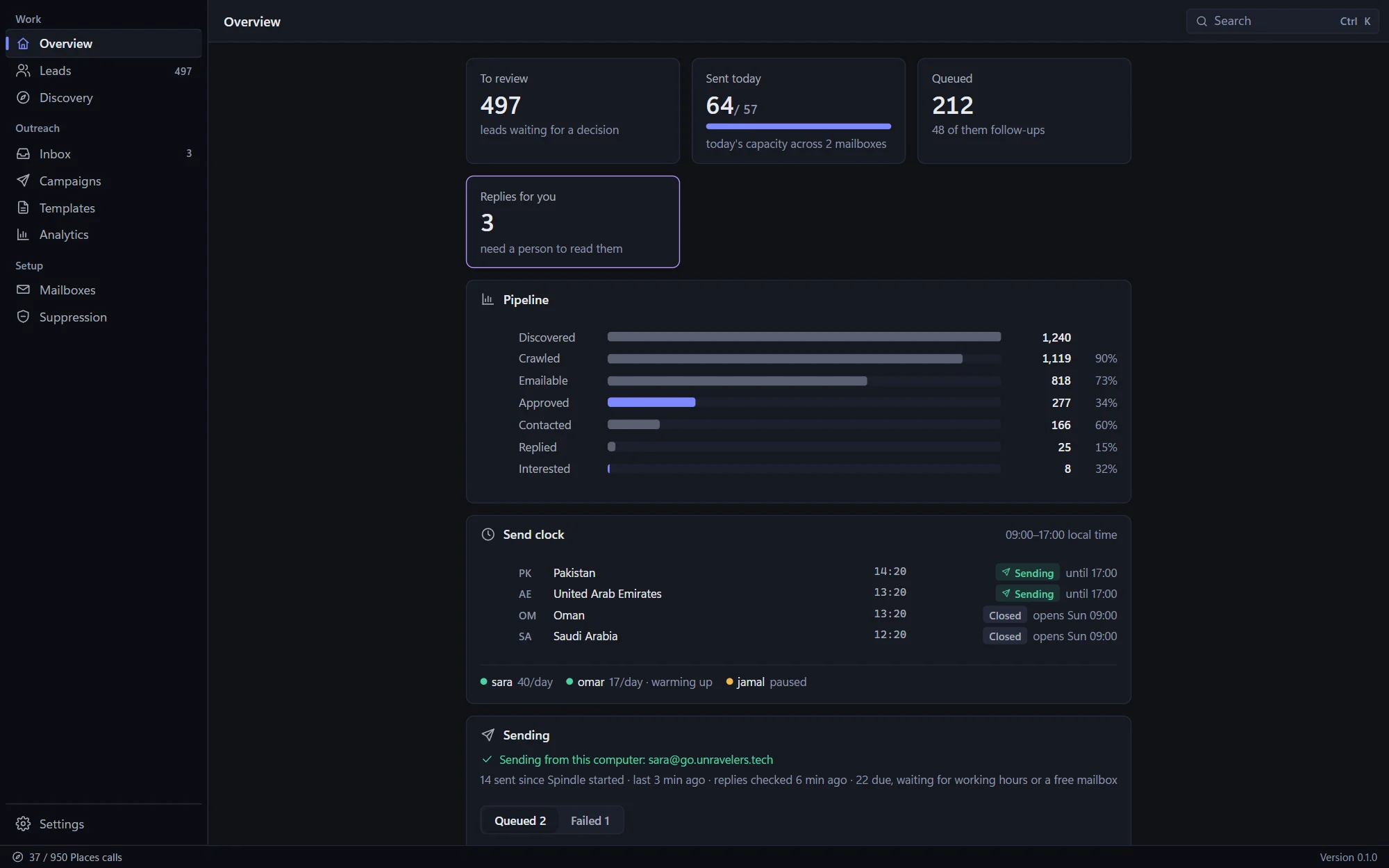
Spindle finds local businesses on Google Maps, reads their websites for contact details, checks and scores every lead, and sends email campaigns with follow-ups from your own mailbox, inside each recipient's working hours. Replies are sorted for you, and opt-outs are respected by the whole team.
Outreach is harder than it looks
Stale lists, unchecked addresses and emails that arrive at the wrong hour, in bulk, from a brand-new mailbox. Spindle starts from businesses that are really there, and sends to them the way a careful person would.
Bought lead lists are shared with everyone else who paid for them, full of people who left, addresses that bounce and businesses that closed last year.
01Search a map, open each website, hunt for a contact page, paste the email into a sheet, guess whether it works. Then do it again for the next city.
02Hundreds of emails at 3 a.m. their time, to addresses nobody checked, from a brand-new mailbox. Bounces climb, spam filters notice, and your real email suffers.
03The one person who said yes is buried between out-of-office notices and bounces, and the follow-up still goes out to someone who asked you to stop.
04From a map to a reply
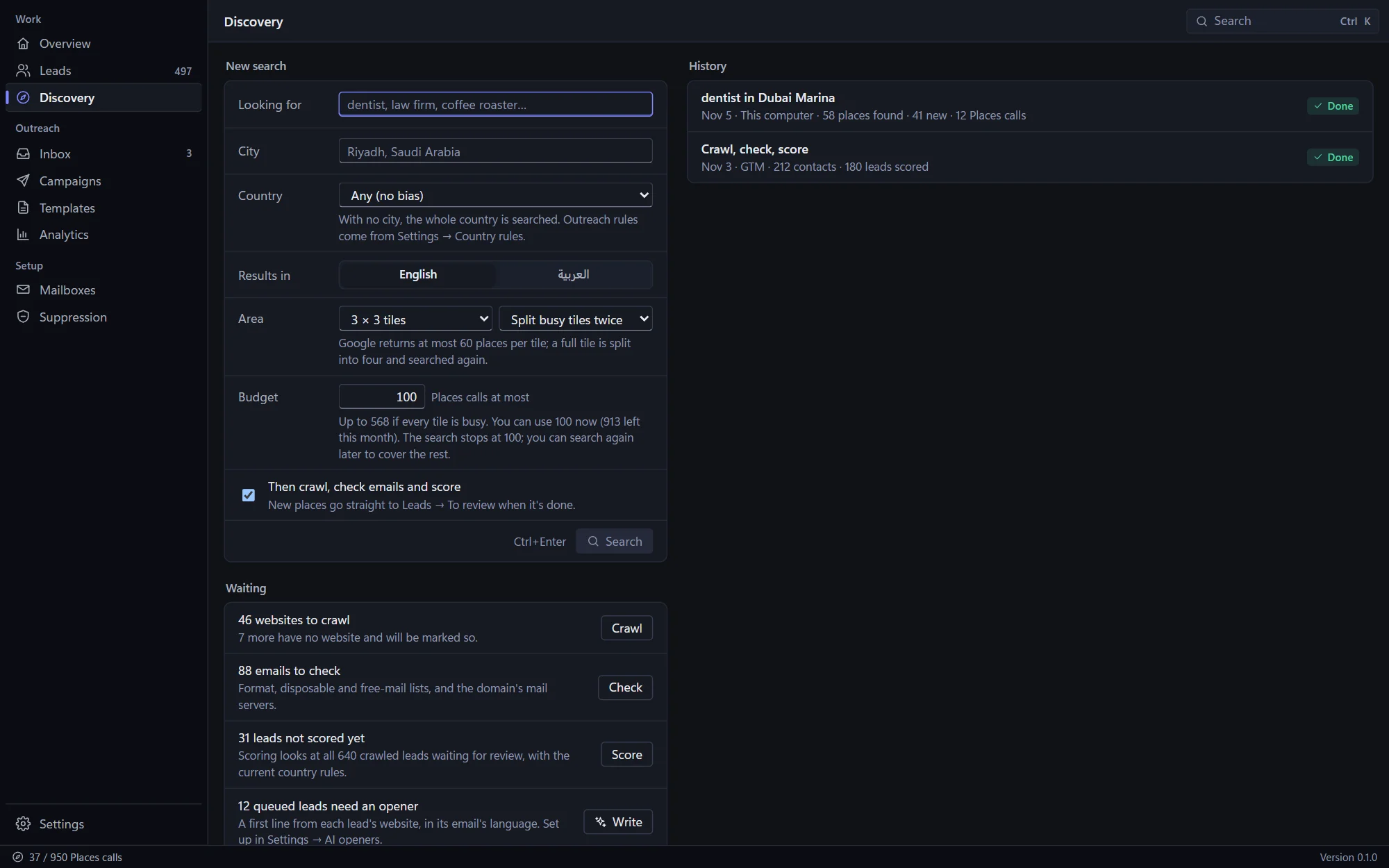
Search Google Maps by trade and city, or a whole country, in English or Arabic. Spindle splits busy areas into tiles so you get every business, within a call budget you set.
It reads each business's website for emails, phones and WhatsApp numbers, checks every address, and scores the lead with the reasons shown, against your rules for each country.
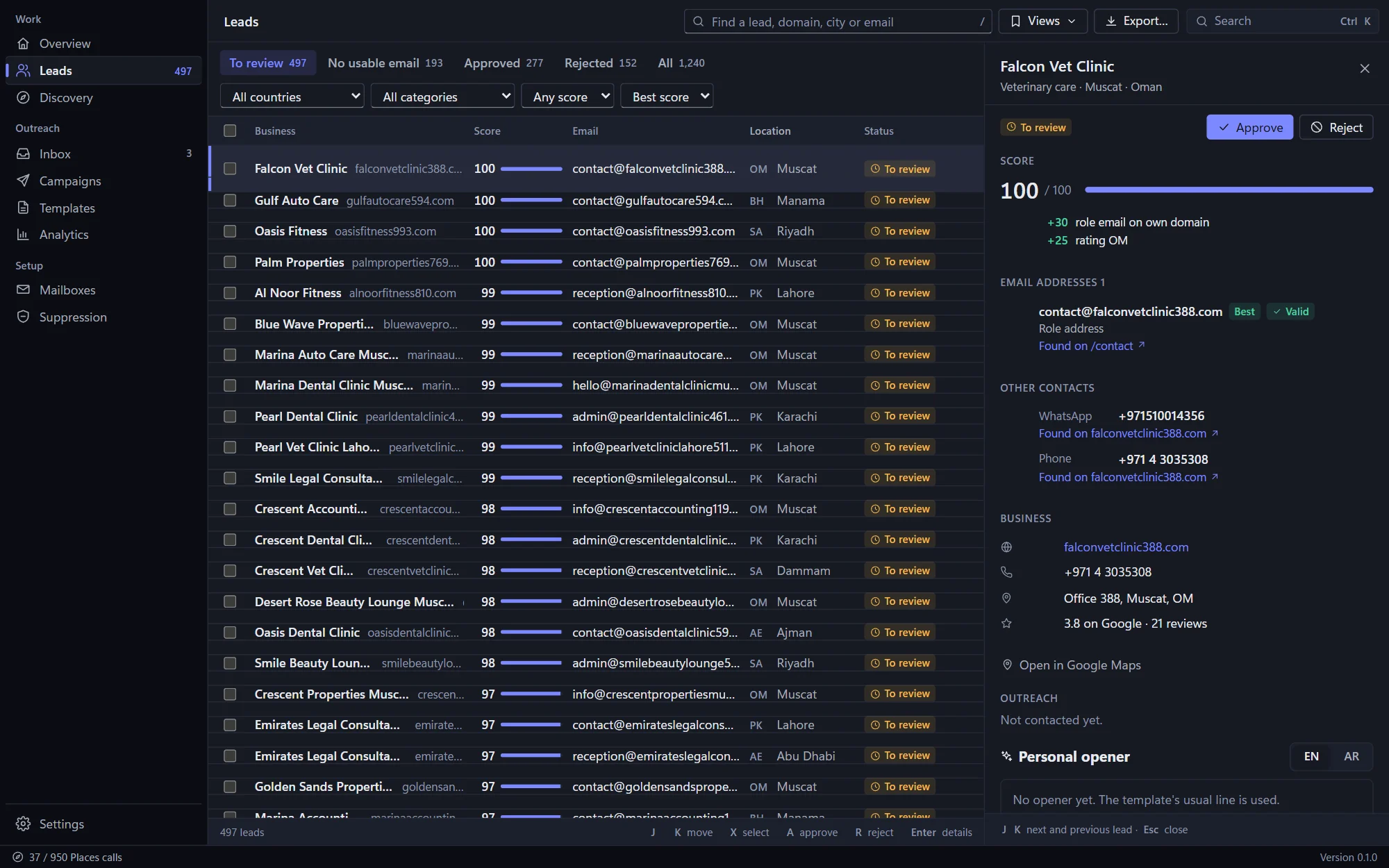
Go through the best leads first from the keyboard: approve, reject or undo, with everything about the business on one screen.
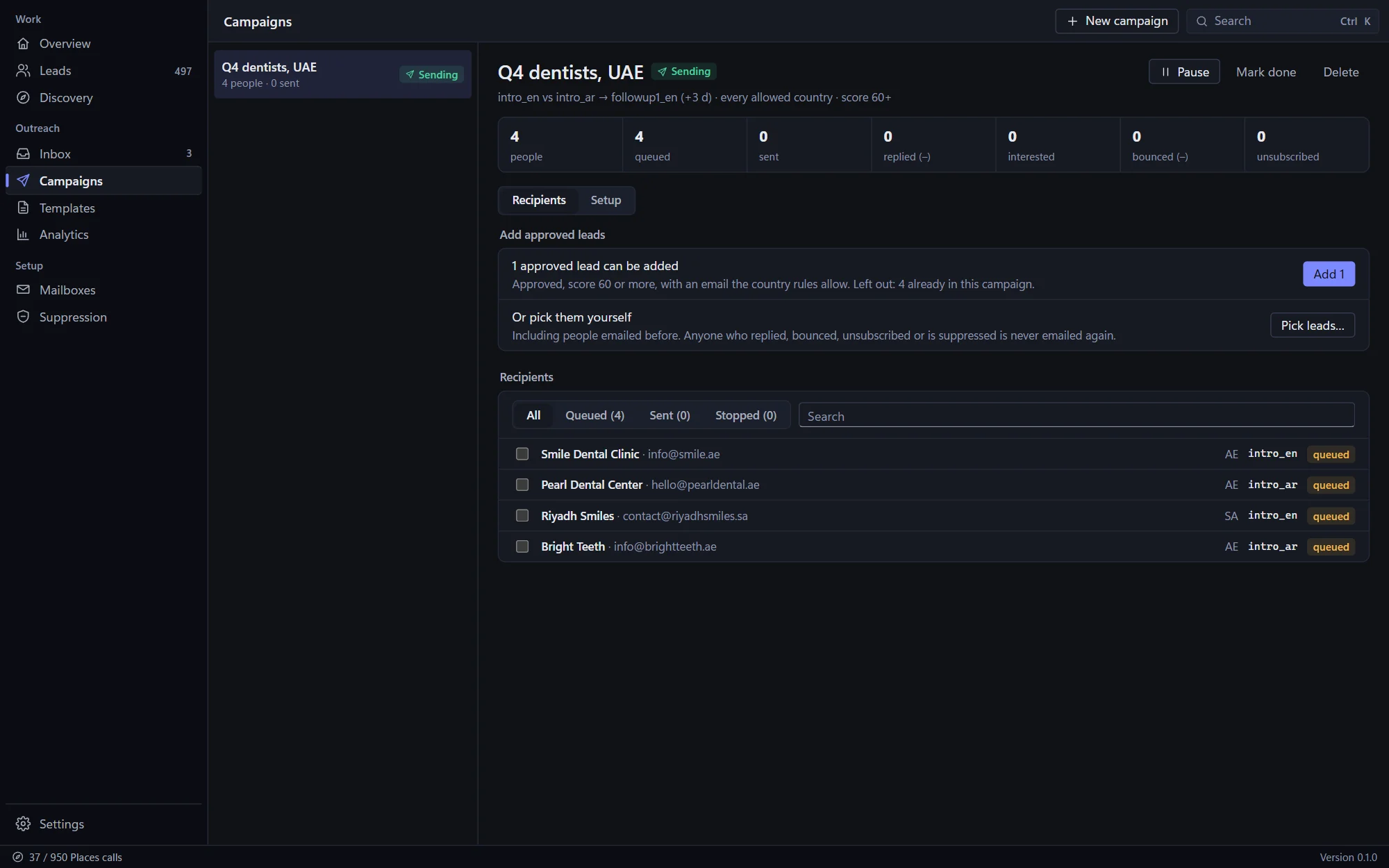
Campaigns go out from your own mailbox, inside each recipient's working hours, with follow-ups in the same thread for people who haven't replied.
Replies are sorted for you, opt-outs and bounces handled, and analytics show which version, country and hour actually get answers.
What's included
One app, from search to reply
Built for people who send outreach every day: fast from the keyboard, careful with your domain, and honest about what works.
Discovery
Type what you're looking for and where. Spindle searches Google Maps in tiles, splits the busy ones, and keeps going until it has them all or reaches the budget you set for that search.
Qualify
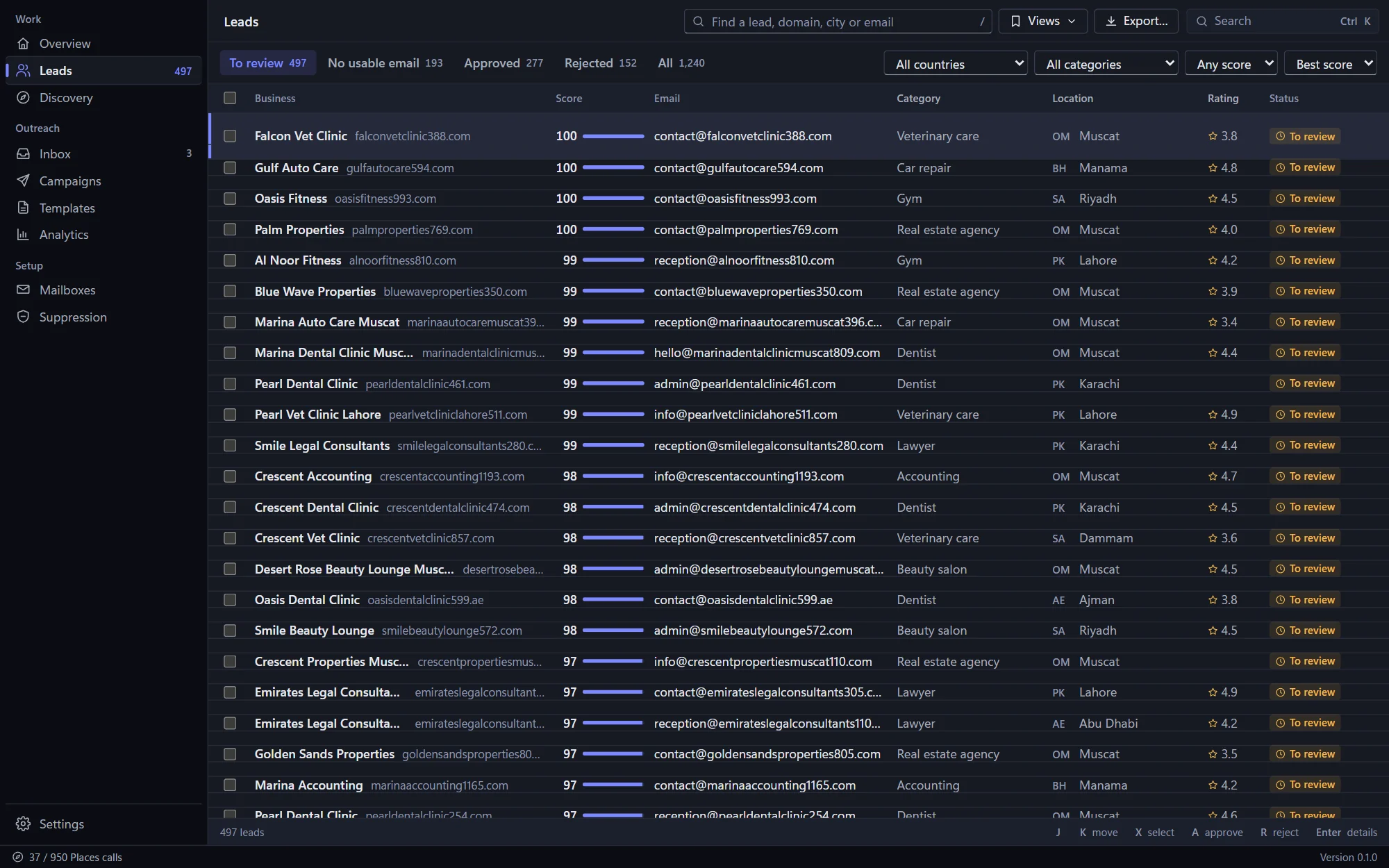
Each website is read for contact details, every address is checked, and each lead gets a score from 0 to 100 with the points behind it, so the best ones are at the top.
Review queue
The review queue is built for the keyboard: move with J and K, approve with A, reject with R, and undo anything. Only leads with an email your country rules allow can be approved.
Templates & AI openers
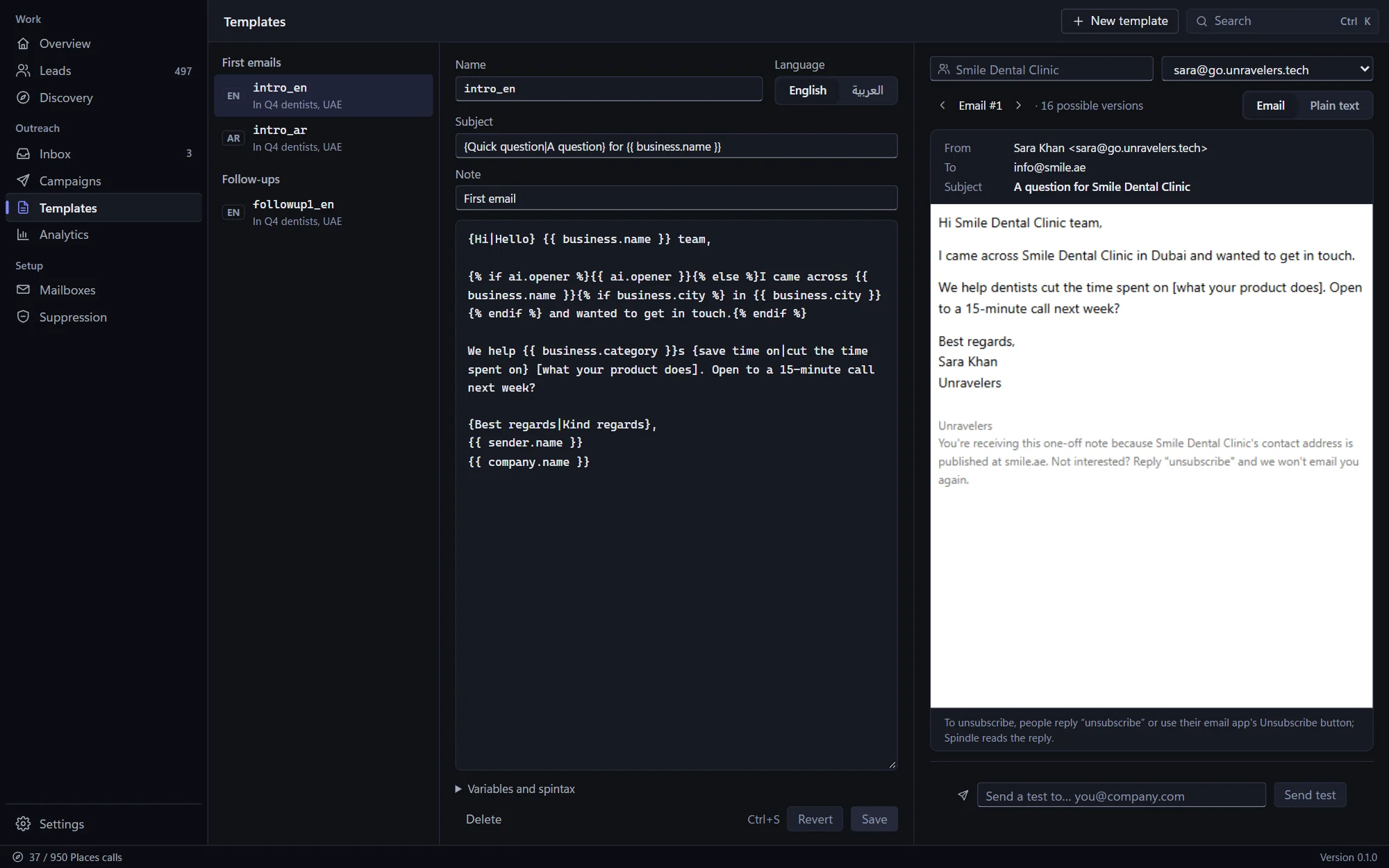
Write once with variations and fields, and every email comes out a little different. Preview it for any lead and any mailbox, then send yourself a test before anything goes out.
Campaigns
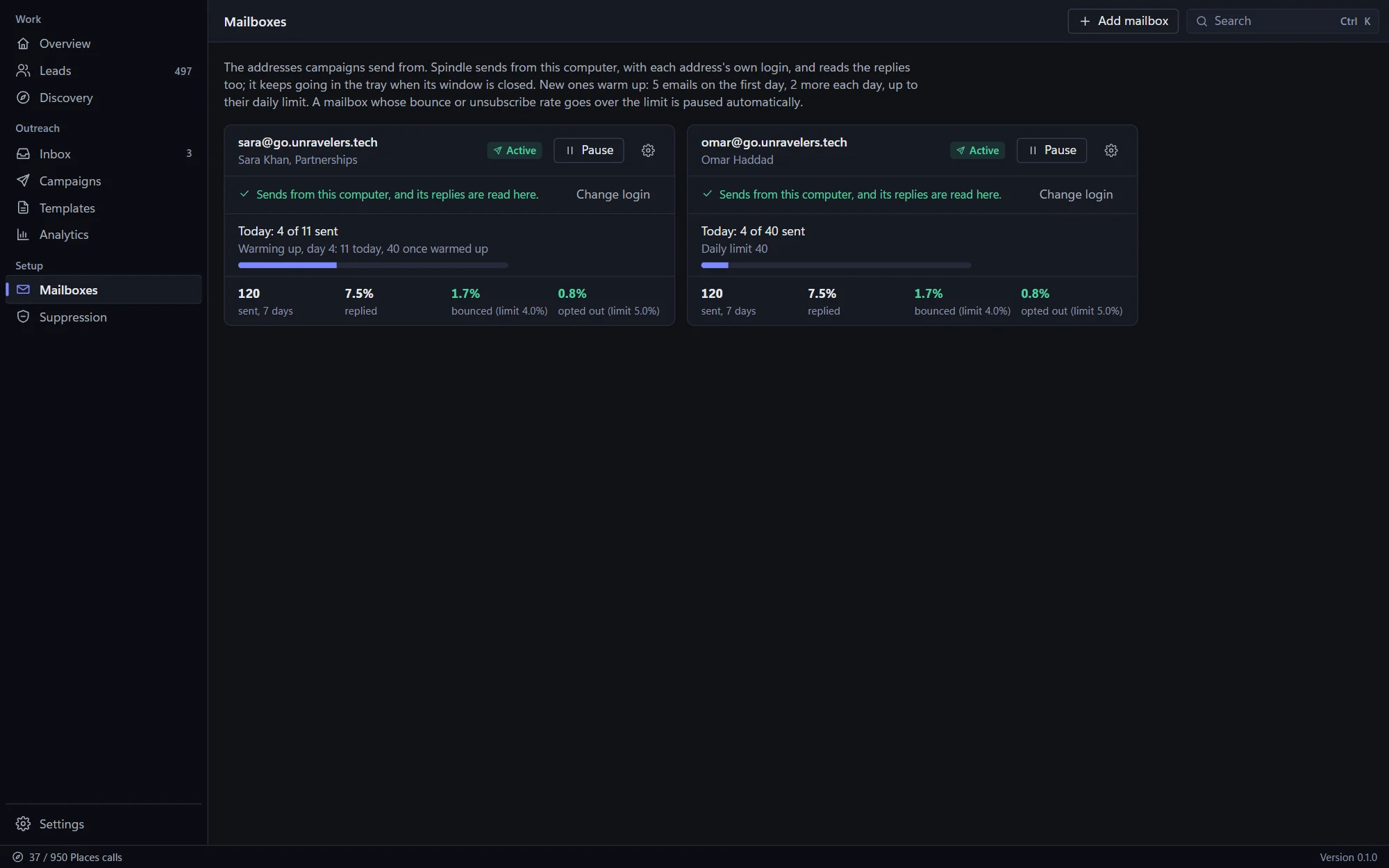
Each person connects their own address, and Spindle sends from their computer during each recipient's working hours, a few minutes apart, within every mailbox's daily limit. New mailboxes warm up gradually.
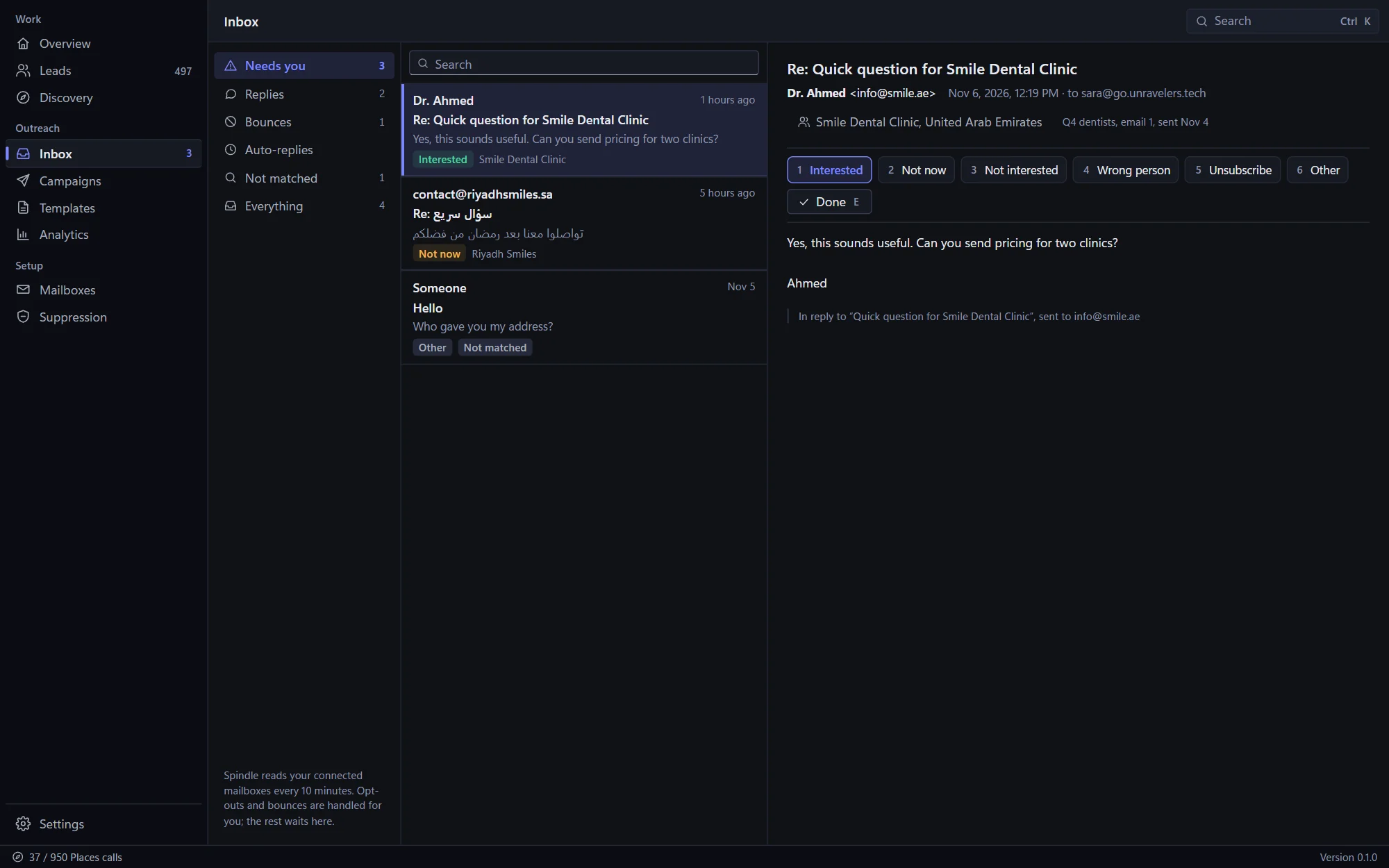
Inbox
Spindle reads your mailbox for replies to your campaigns and sorts them: interested, not now, not interested, wrong person, unsubscribe. Bounces and auto-replies are handled without you.
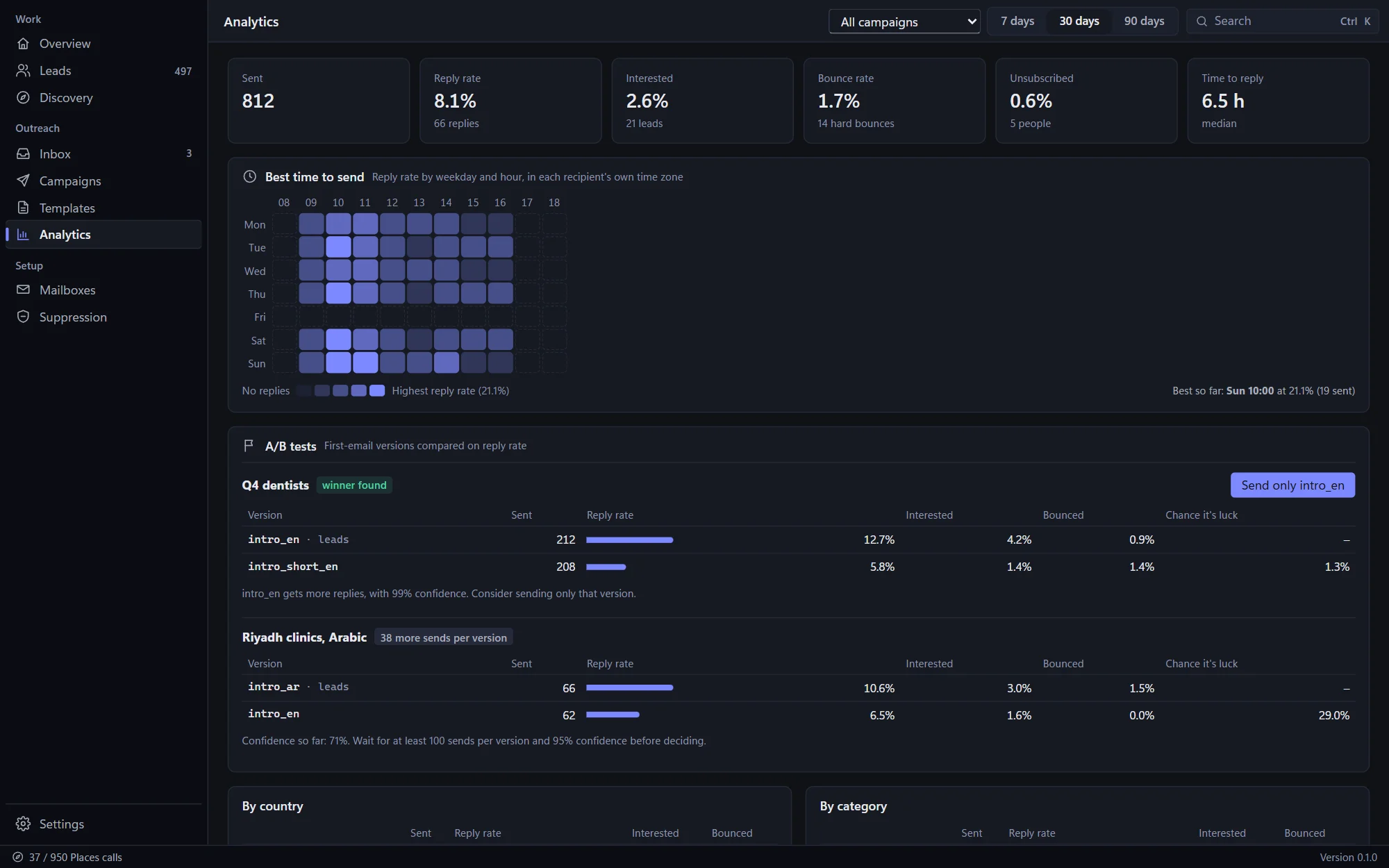
Analytics
Reply rates by country, category, template, mailbox and step, the best weekday and hour in each recipient's own time, and A/B tests that tell you when one version has really won.
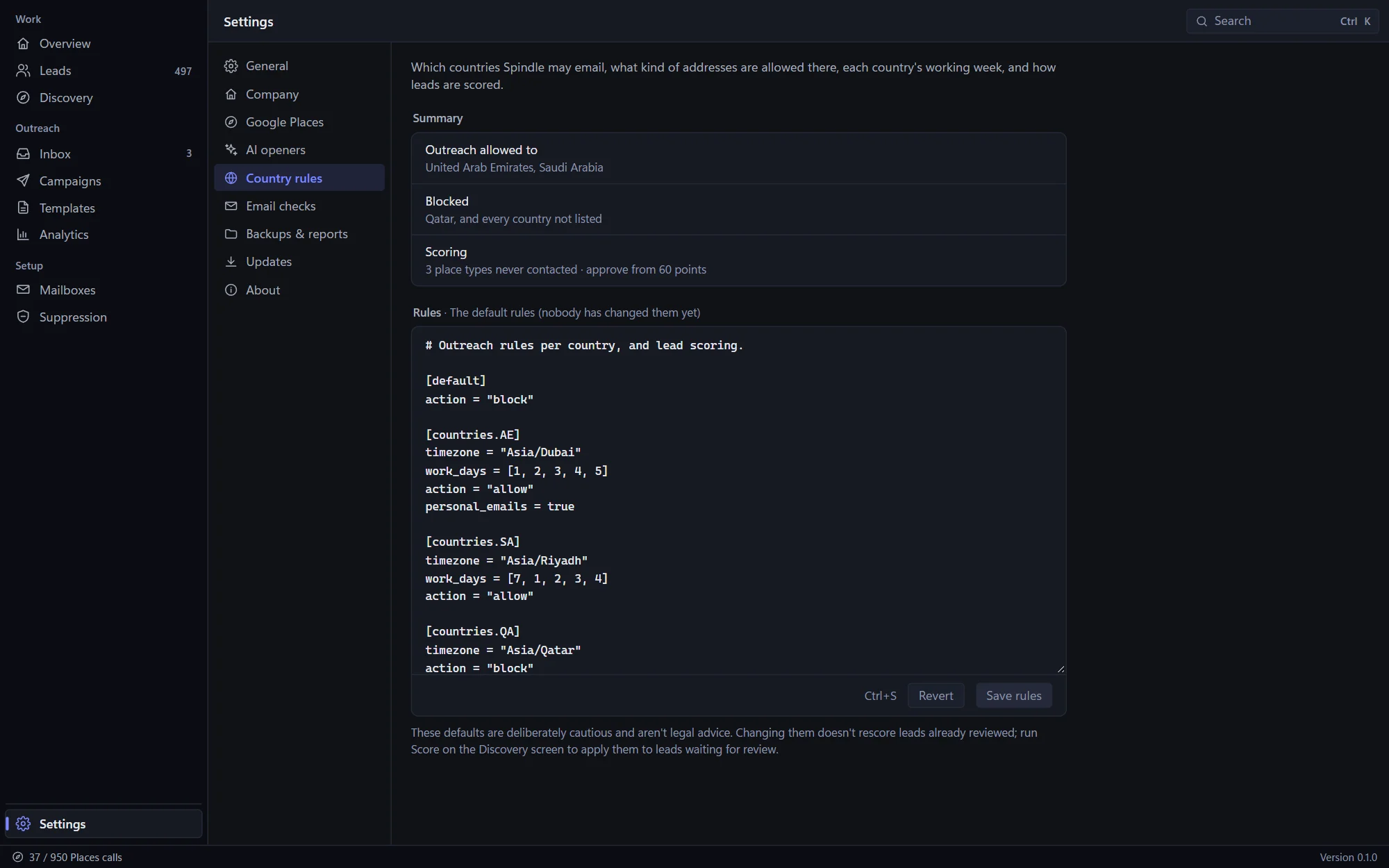
Polite by design
The fastest way to ruin cold email is to send too much, too soon, to the wrong people. Spindle's limits are on by default, so a busy week never costs you your reputation.
For one person or a whole team
Everything happens on your computer first, so screens are instant and nothing stops when the connection does. Changes sync when it's back.
Each person's leads, campaigns and replies are their own; the rules, templates, mailboxes and opt-out list are shared with the team.
Close the window and Spindle keeps sending and reading replies from the tray. It can start with the computer too.
A command palette for every action, shortcuts on every screen, and light and dark themes.
A copy of your data every day, the newest seven kept, and a restore that can be undone.
One app for the whole team, whatever they use.
Searches, templates and replies in both, with Arabic laid out right to left.
Send any template to yourself, reply to it, and see exactly how Spindle will read the answer.
Private by design
Works with
Your own Google Places key for discovery, your own mailbox for sending, and your own AI key for openers, each with limits you set.
Spindle vs a bought list
| Capability | Bought list & a mail-merge tool | Spindle |
|---|---|---|
| Where leads come from | A list everyone else bought too | Google Maps, found for your trade and area |
| Contact details | Whatever came in the file | Read from each business's own website |
| Bad addresses | Found out when they bounce | Checked before anything is sent |
| Which leads first | Top of the spreadsheet | A score with its reasons |
| Sending | All at once, any hour | Their working hours, minutes apart, within daily caps |
| New mailboxes | Full volume on day one | Warmed up gradually |
| Personal touch | Name and company merged in | Variations and an AI-written first line per lead |
| Replies | Mixed into a busy inbox | Sorted, matched to the lead, follow-ups stopped |
| Opt-outs | A spreadsheet someone forgets | One list the whole team respects |
| What works | Gut feeling | A/B tests and the best hour, per country |
| Arabic | Usually an afterthought | Templates, searches and replies, right to left |
Get Spindle 0.1.1
Pick the file for your system. We'll email you a one-time code, and the download starts as soon as you enter it. Each person on your team installs it on their own computer.
Windows 10 and 11, 64-bit
Apple silicon or Intel
64-bit (x86_64)
First launch, setup & updates
If Windows shows "Windows protected your PC", choose More info → Run anyway. On Windows 10, the installer adds Microsoft's WebView2 if it's missing.
Drag Spindle into Applications. The first time, open System Settings → Privacy & Security and click Open Anyway. (On macOS 14 and earlier, right-click the app and choose Open.)
Install the .deb with apt or the .rpm with dnf, like any other package. The AppImage needs no install: make it executable (chmod +x) and run it.
Add your Google Places key with a monthly limit, check the country rules, and connect your mailbox with an app password. Then send yourself a test from Templates.
Spindle checks for new versions and installs them for you, keeping your leads, campaigns and settings.
You'll need a Google Places API key and a mailbox that allows SMTP and IMAP with an app password. The first-launch warning appears because Spindle is new and not yet widely downloaded; it only shows once. Verify your download (optional): each file's SHA-256 checksum is in SHA256SUMS.txt. Want a hand getting your team started? Email jamal@unravelers.tech.
FAQ
Something else? Email jamal@unravelers.tech.
Spindle is a desktop app from Unravelers Technologies for finding local businesses and reaching them with polite email outreach. It finds businesses on Google Maps, reads their websites for contact details, checks and scores every lead, and sends campaigns with follow-ups from your own mailbox, then sorts the replies.
From Google Maps, through the Google Places API, using your own API key. You pay Google for the searches directly, and Spindle counts every call against the monthly and per-search limits you set, so there are no surprises.
No. Emails leave from your own mailbox, through your own email provider, from the computer Spindle runs on. That means your computer needs to be on and Spindle running (it can sit in the tray) during the hours your emails go out.
Gmail and Google Workspace, Microsoft 365 and Outlook, Zoho, Yahoo, iCloud and any provider with SMTP and IMAP. Most need an app password rather than your normal password; for Google that means turning on 2-Step Verification first.
Each email has an unsubscribe header, so Gmail and Outlook show their own Unsubscribe button, and a footer line saying to reply "unsubscribe". Either way, Spindle reads it and adds the person to the team's opt-out list, and nothing more is sent to them.
It depends on the country, and on whether you email businesses or people. Spindle lets you block countries, allow only business addresses, and respect working hours and opt-outs, but the rules for your market are yours to check; we can show you how we set it up for the Gulf.
Yes. Searches can return Arabic results, templates can be written in Arabic and are laid out right to left, and Arabic replies such as unsubscribe requests are understood.
You use your own Claude or OpenAI-compatible API key and set a monthly limit; writing one opener costs a fraction of a cent. They're optional: without them, the template's usual line is used.
Yes. Each person has Spindle on their own computer with their own leads and mailbox, while the rules, templates and opt-out list are shared, and nobody adds a business a teammate already found.
Windows 10 and 11, macOS on Apple silicon and Intel, and 64-bit Linux (.deb, .rpm or AppImage).
Both systems double-check apps that aren't yet widely downloaded. It only happens on the first launch; the steps are in the download section above.
It depends on your team and the help you need to get started. Email us and we'll talk it through.
Sales, business development and agencies
Download Spindle for Windows, macOS or Linux, or let us show you how it finds, scores and reaches businesses in your market.