Clicking around before every release
Someone opens the app, tries a few pages and calls it tested. The page nobody opened is the one that broke.
01
 Free for Windows, macOS & Linux · v0.1.0
Snag opens your web app in its own browser, goes through every page and clicks what people click, then tells you what is broken, at desktop, tablet and phone sizes, with the steps to see it again.
Testing a web app by hand
Writing end-to-end tests takes weeks and covers the paths someone thought of. Clicking around covers less. Snag covers every page it can reach, every time.
Someone opens the app, tries a few pages and calls it tested. The page nobody opened is the one that broke.
01A table that pushes the page sideways on a phone, a button hidden behind a banner on a tablet. Nobody checks every size.
02A request that fails, a script that throws, an image that never loads. The page still looks almost right, so the bug lives on.
03A small style change moves a button on twenty pages, or checkout quietly breaks after a deploy. You hear about it from a customer.
04How it works
No test scripts to write first. The first scan takes a minute or two for a small app.
Your laptop, staging or the live site. Behind a login? Snag signs in with a form, two-factor codes, cookies or a session you sign in to once.
Snag opens every page it can reach in its own browser, at desktop, tablet and phone sizes, and clicks the menus, tabs and dialogs people would.
Each problem comes with what it means, how to fix it, the pages it is on, a screenshot and the steps to see it again. Replay them in one click.
What Snag finds
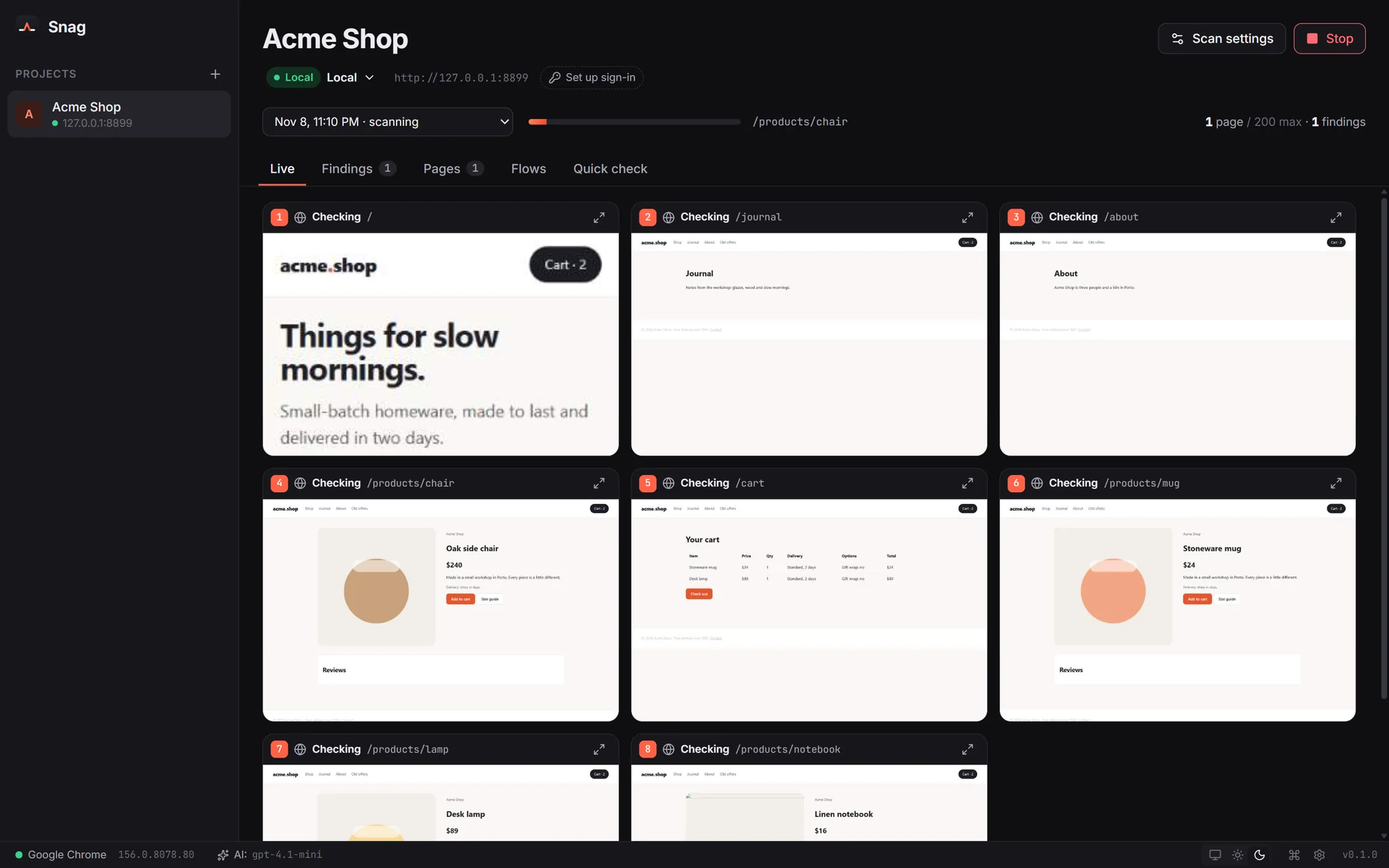
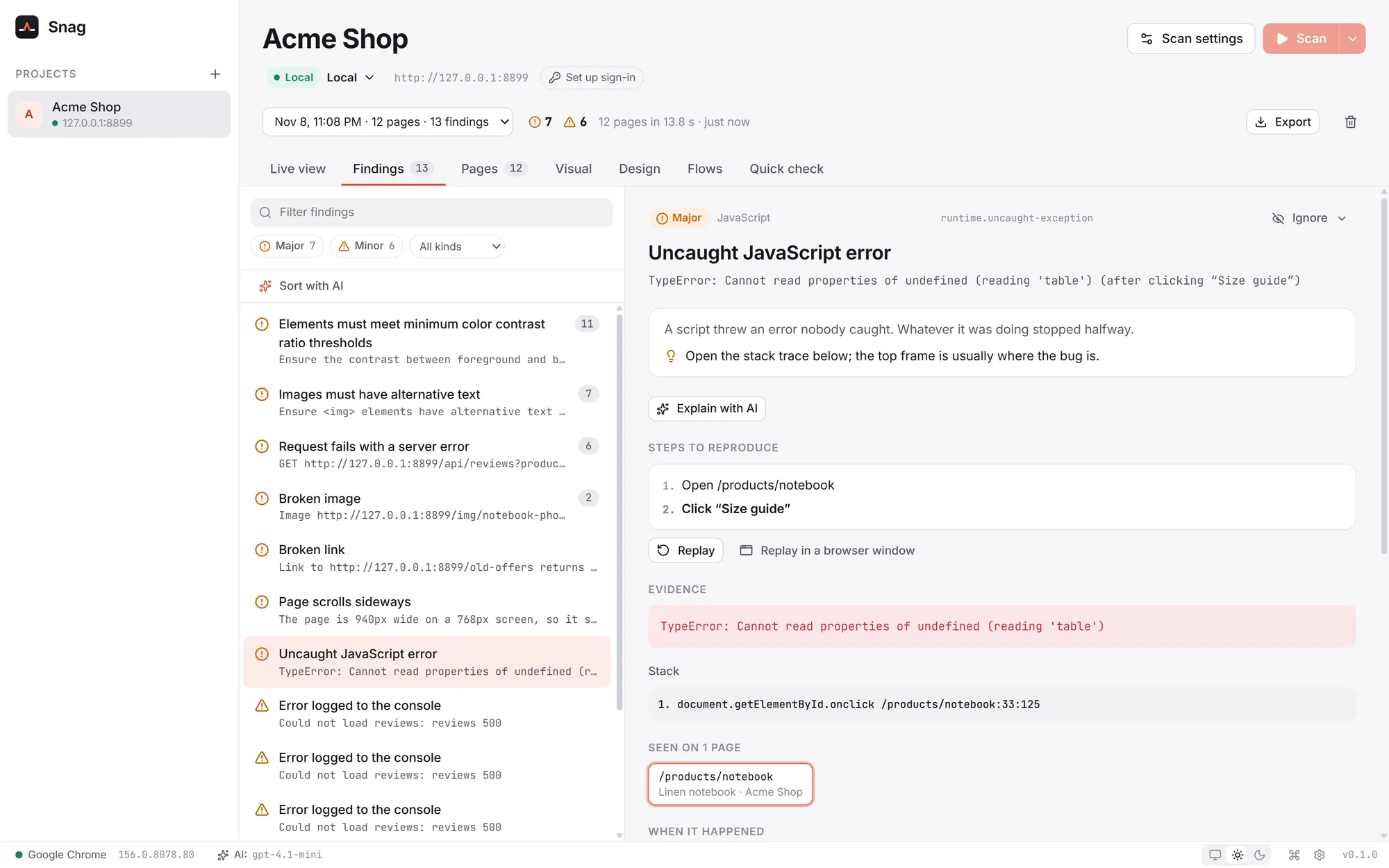
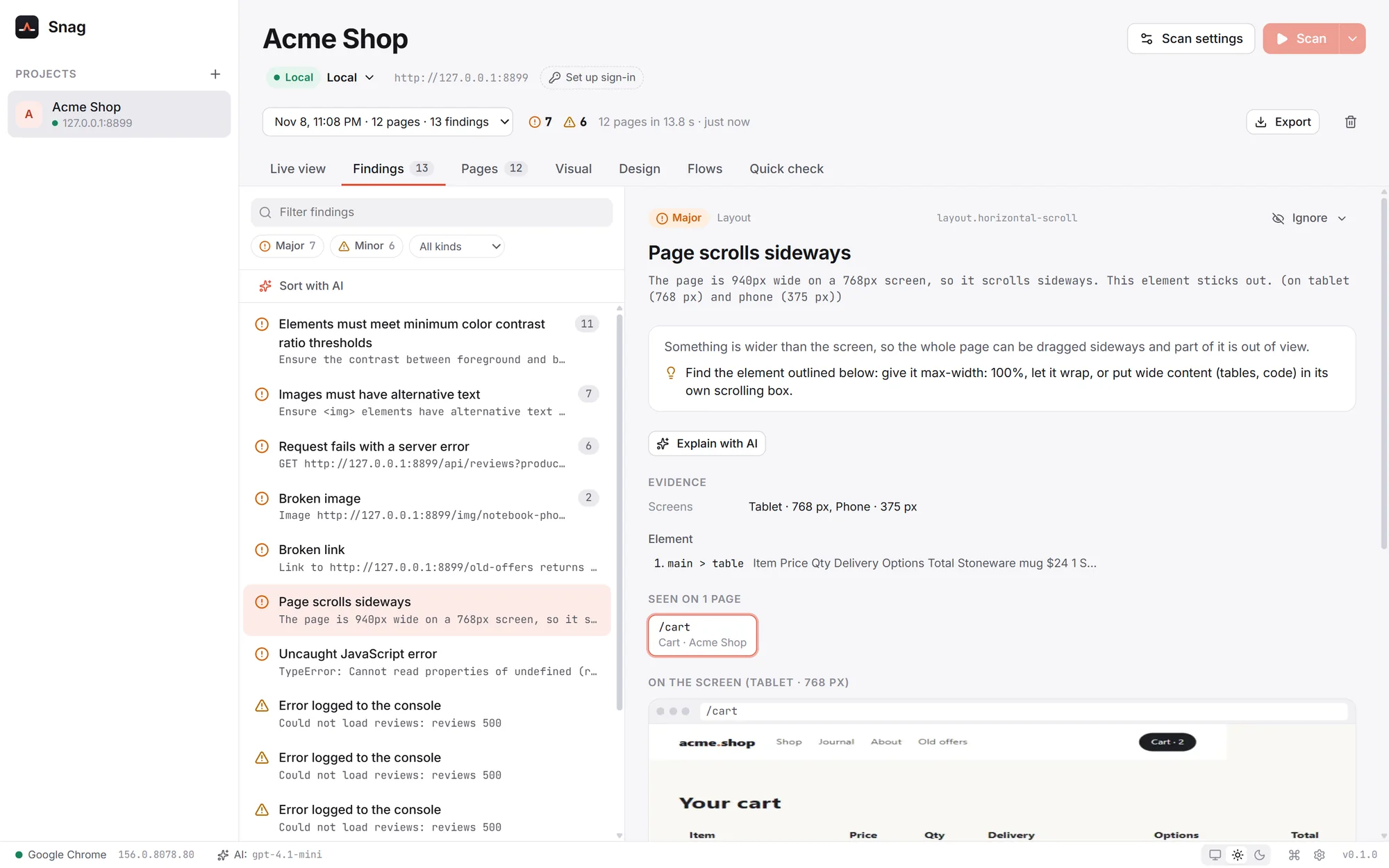
These screenshots are Snag scanning Acme Shop, a small demo store with a few bugs planted on purpose.
Findings
Snag reports what broke and how it got there: "Open /products/notebook, click Size guide" ends in a JavaScript error, and Replay does it again in front of you. A security header missing on twenty pages is one finding, not twenty.
Every screen size
Layout and accessibility are checked at each size, with the problem marked on the screenshot: a cart table that makes the page scroll sideways on a tablet, text over text, buttons too small to tap, contrast too low to read.
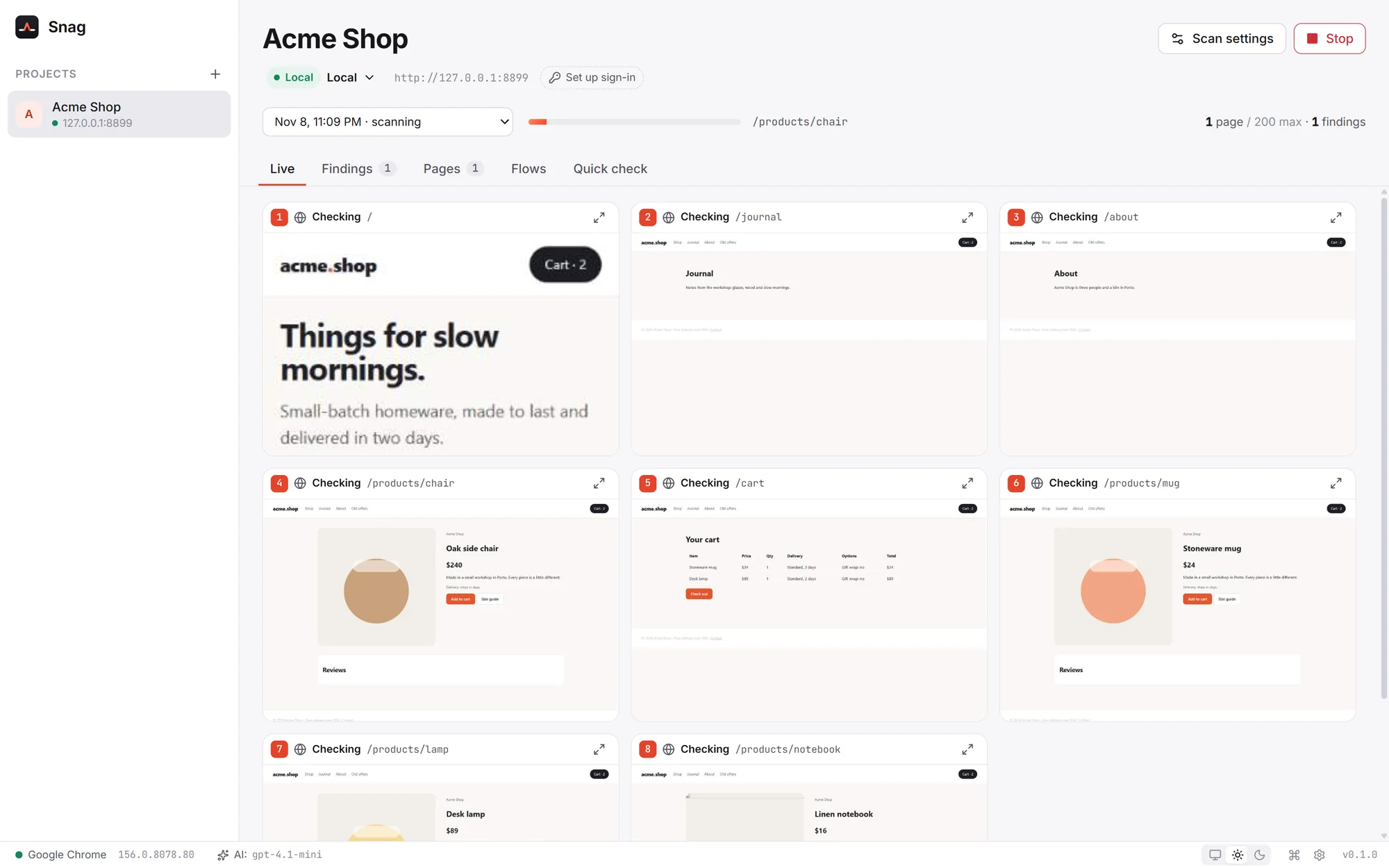
Live view
Snag checks many pages at once, and the live view shows each tab as it goes, with every click and keystroke outlined in the page. Enlarge one tab, or open a real browser window and watch at human speed.
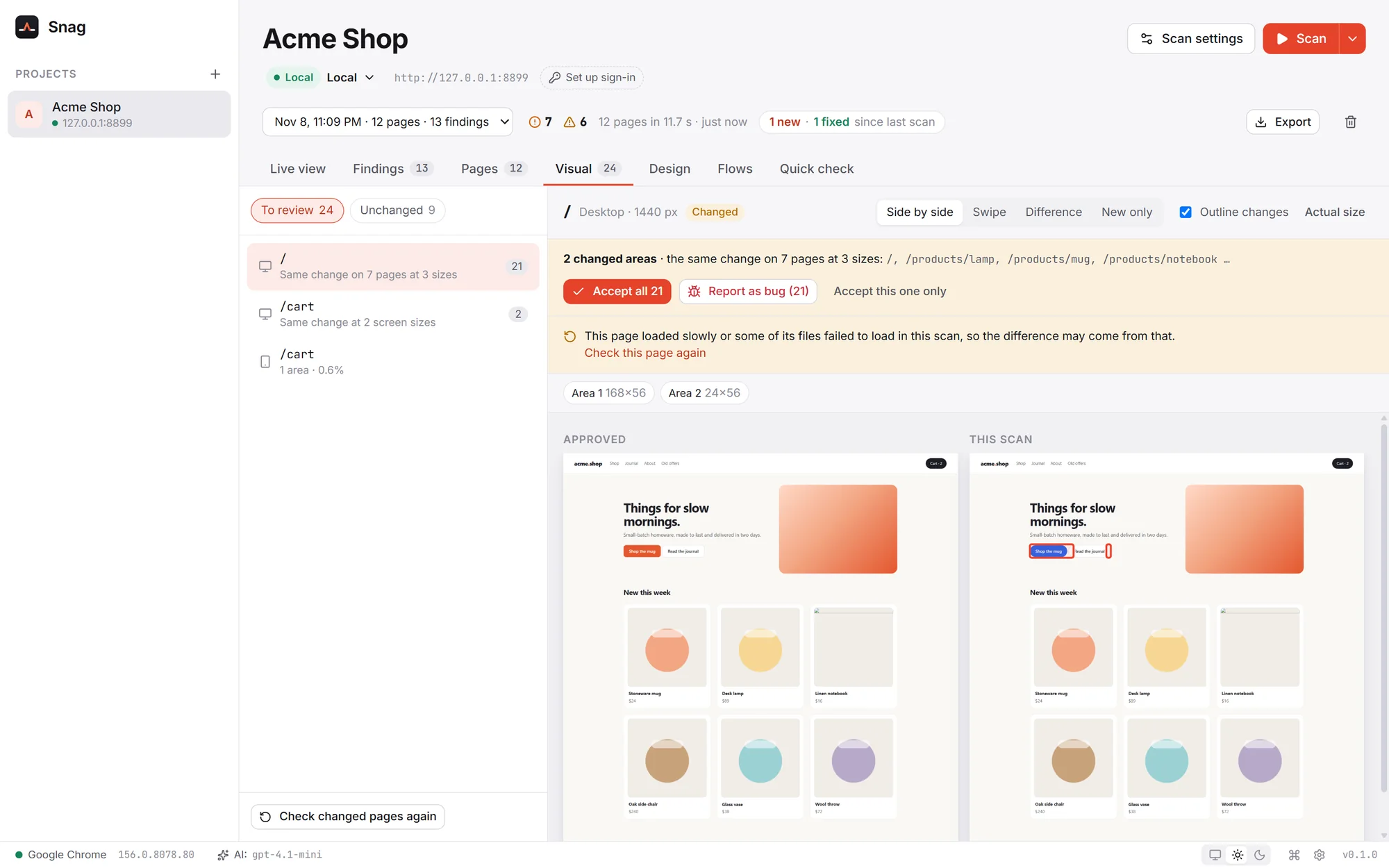
Visual changes
Every page is captured at every size and compared with the version you approved. A change that shows up on many pages is one decision: accept it everywhere, or report it as a bug. Clocks, animations and other things that change by themselves are left out.
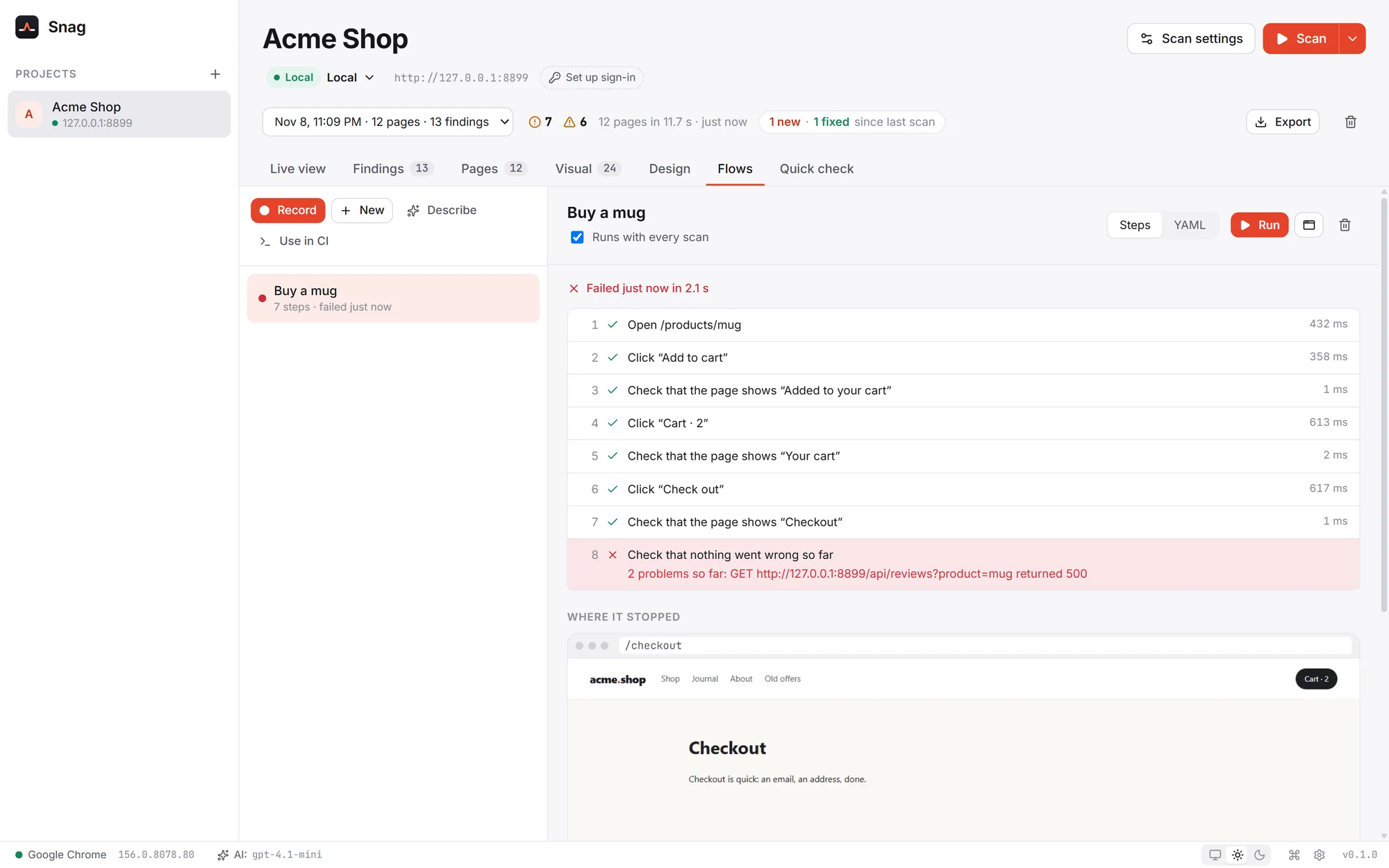
Flows
Record sign-up, checkout or a booking once by clicking through it in a window, or describe it in a sentence and let AI draft it. Snag replays it with every scan and tells you which step broke. Here the checkout works, but a failed request on the way is caught.
In your pipeline
Use in CI writes a snag.toml and your flows for the command line. Run it in any pipeline, on any server, and catch what broke before it ships.
# Scan staging and run its flows
$ snag run --env staging

Acme Shop · staging · https://staging.acme.test
Scanned 40 pages in 52.1 s
  passed  Buy a mug (3.2 s)
  FAILED  Sign up: step 4 (Click “Create account”)
  wrote snag-report/report.html
FAILED: 0 critical, 2 major, 5 minor; flows 1/2 passed

# Fail only on serious problems
$ snag run --fail-on critical
Everything else you'd expect
Sign-in forms with two-factor codes, cookies, HTTP Basic, API headers, or sign in by hand once for SSO and security keys.
Export a scan as a PDF or one HTML file: a summary, every finding with its screenshot and advice, and the pages checked.
Visual review of each page kind, plain-language explanations, sorting by impact and drafting flows. Claude, OpenAI, Gemini, a local model and more.
Fixed something? Re-check only the pages that had problems.
Your laptop, staging and production in one project, each with its own settings and sign-in.
A command palette (Ctrl+K) and shortcuts for scanning, tabs and reports.
Themes that follow your system.
Uses Chrome, Edge or Chromium on your computer, or downloads its own. Your profile, history and sign-ins are never touched.
Private by design
Snag vs writing end-to-end tests
Keep your tests for the logic only you know. Let Snag cover everything else.
| Capability | End-to-end tests | Snag |
|---|---|---|
| Setup | Write and maintain test scripts | Paste an address |
| Pages covered | The ones someone wrote a test for | Every page it can reach |
| Screen sizes | Usually one | Desktop, tablet and phone |
| Hidden errors | Missed unless a test looks | Failed requests, console and script errors |
| Accessibility | A separate tool | Built in |
| Visual changes | Another service, often paid | Built in, grouped across pages |
| Key journeys | Code | Recorded or described, kept as YAML |
| Price | Per seat or per run | Free |
Get Snag 0.1.0 · Free
Pick the file for your system. We'll email you a one-time code, and the download starts as soon as you enter it.
Windows 10 and 11, 64-bit
macOS 11 Big Sur or later
64-bit (x86_64)
snag run, for CI and servers. No window
First launch & command line
If Windows shows "Windows protected your PC", choose More info, then Run anyway. On Windows 10, the installer adds Microsoft's WebView2 if it's missing.
Drag Snag into Applications. The first time, open System Settings, then Privacy & Security, and click Open Anyway. (On macOS 14 and earlier, right-click the app and choose Open.)
Install the .deb with apt or the .rpm with dnf, like any other package. The AppImage needs no install: make it executable (chmod +x) and run it.
Unpack the archive and put snag on your PATH. It scans with Chrome, Edge or Chromium installed on the machine.
The first-launch warning appears because Snag is new and not yet widely downloaded; it only shows once. Updating: download the new version from this page and install it over the old one. Your projects and settings are kept. Verify your download (optional): each file's SHA-256 checksum is in SHA256SUMS.txt.
FAQ
Something else? Ideas or partnership enquiries? Email jamal@unravelers.tech.
Yes. Every feature, for as many projects and scans as you like, with no account.
No. Snag looks at your app from the outside, in a browser, like a visitor. Nothing to install, no script to add.
Yes. Give it a sign-in form (with two-factor codes if needed), cookies, HTTP Basic or API headers, or sign in by hand once for SSO and security keys. Snag signs in again if the session ends.
Clicks never save anything: requests that would change data are blocked while Snag explores. It sends forms only when you turn that on, never forms that edit existing records, and never clicks delete, pay or sign out. Staging and live sites are read-only by default.
Yes. Production environments are read-only and scanned gently (a few pages a second), and Snag asks before each scan.
No. AI assist is optional. Use your own key for Claude, OpenAI, Gemini and others, or a model on your own computer with Ollama or LM Studio.
Yes. snag run scans and runs your flows from a snag.toml, writes HTML, JSON, JUnit and SARIF reports, and fails the build on the severities you choose.
Download them from this page. Your projects and settings are kept.
Both systems double-check apps that aren't yet widely downloaded. It only happens on the first launch; the steps are in the download section above.
Windows 10 and 11 (64-bit), macOS 11 or later on Apple silicon and Intel, and 64-bit Linux (Ubuntu, Debian, Fedora, openSUSE and others). Snag scans with Chrome, Edge or Chromium.
Your next release
Snag is free for Windows, macOS and Linux. Paste an address, scan, and fix what it finds before anyone else does.