Line endings & encodings
A file that only went from LF to CRLF, or UTF-8 to UTF-16, is marked "same content" — with a note saying why.
01
Windows · macOS · Linux · v0.1.0
Most diff tools tell you which lines changed. Rift tells you what changed — the setting that moved, the price that went up, the file that was renamed, the pixels that are different. Across files, folders, spreadsheets, data and images.
Stop reading noise
Reordered keys, Windows vs Unix line endings, a timestamp in a log, a list sorted differently. Rift recognises the differences that don't matter, so the ones that do stand out.
A file that only went from LF to CRLF, or UTF-8 to UTF-16, is marked "same content" — with a note saying why.
01Ignore trailing spaces, extra spaces, all whitespace or letter case, with one click.
02Built-in ignore patterns for the values that always differ — or write your own.
03Commit a .riftrules file and everyone compares the same way: same patterns, same excluded folders, same settings.
04One tool, every kind of file
Folders, config, spreadsheets, images and merges — each compared the way a person would read it.
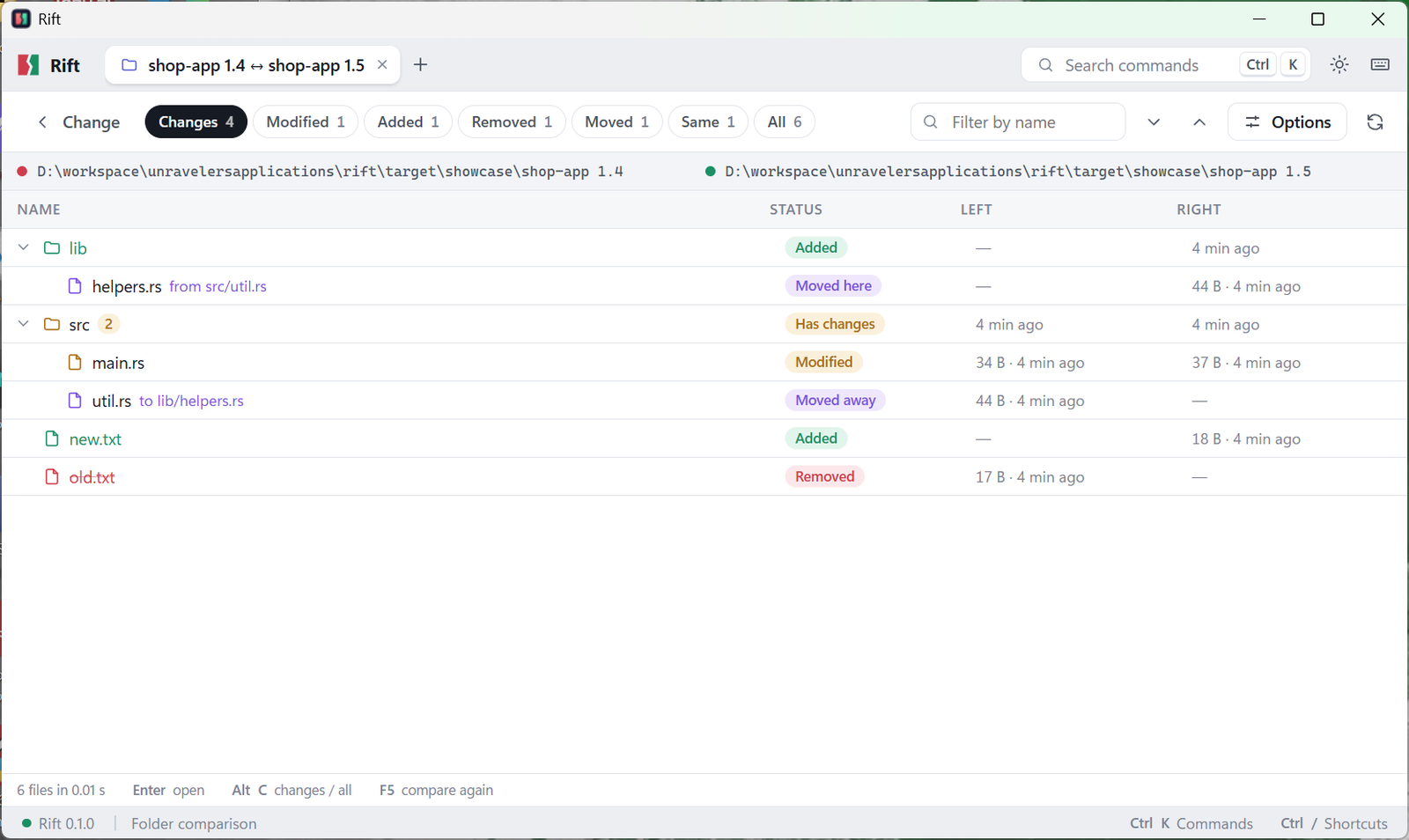
Folders
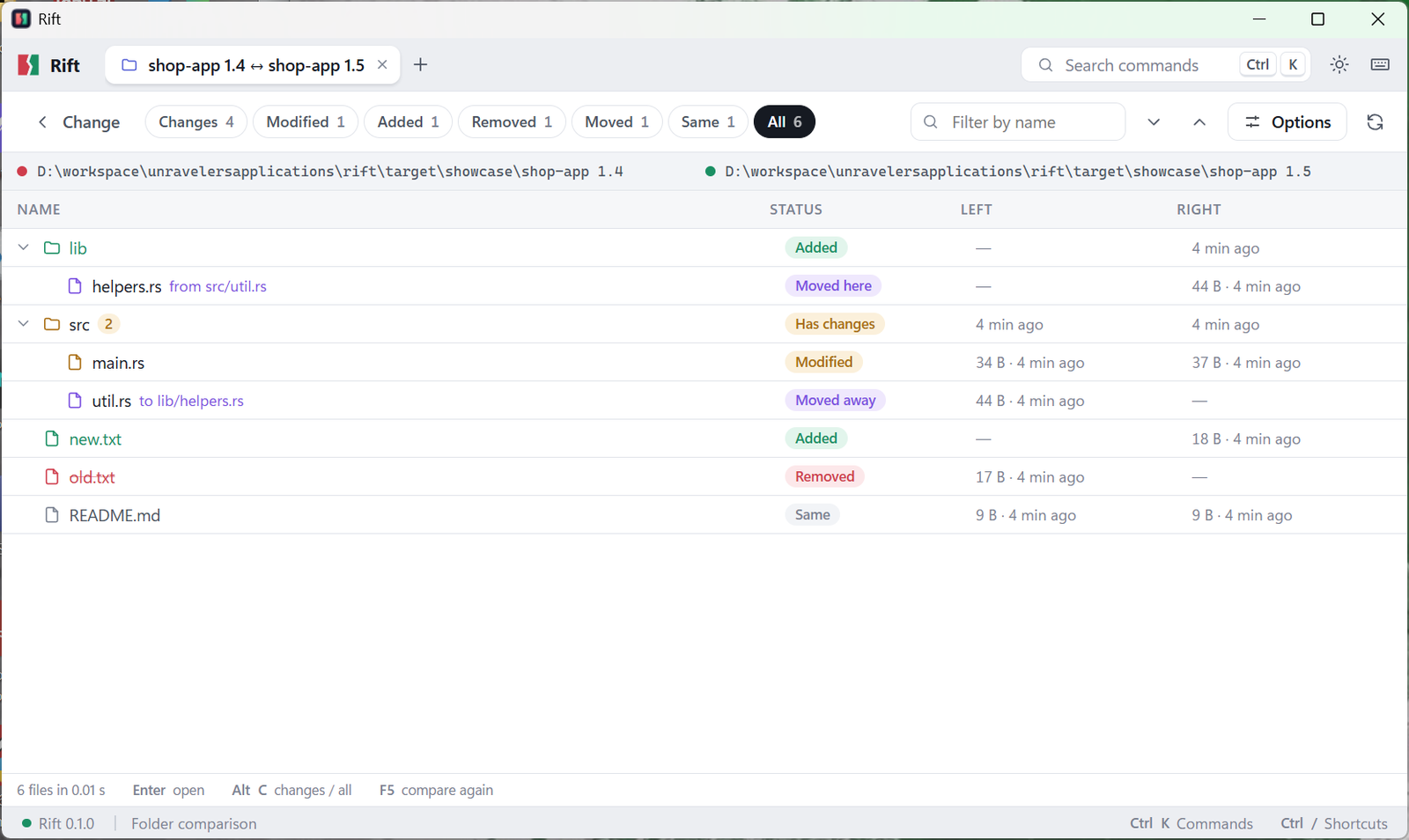
Other tools show a moved file as one deleted and another added. Rift recognises the same file in a new place and says so: src/util.ts → lib/helpers.ts.
JSON · YAML · TOML · XML
Rift reads configuration as data, not text. Keys that moved around, or 1.0 becoming 1, are not changes. The settings that actually changed are — and nothing else.
~ server.port: 8080 → 8443
~ users[id=1].role: "admin" → "owner"
- users[id=2]
+ logging: {"level": "info"}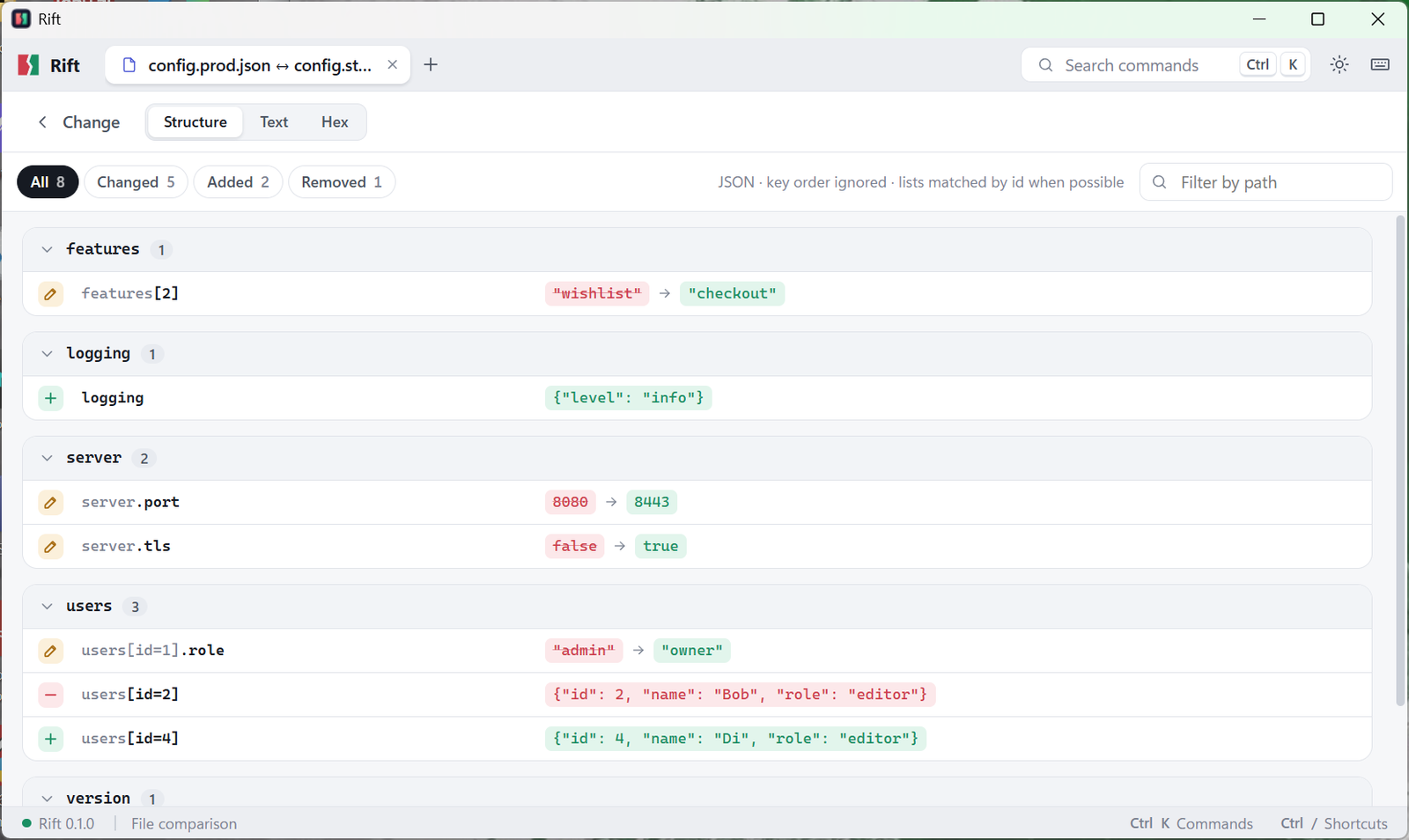
Excel · OpenDocument · CSV
Compare XLSX, XLS, ODS and CSV the way you think about them: as rows of records. A sorted or reordered sheet is no longer "everything changed".
sku=A-100: price 2.50 → 2.75; stock 120 → 110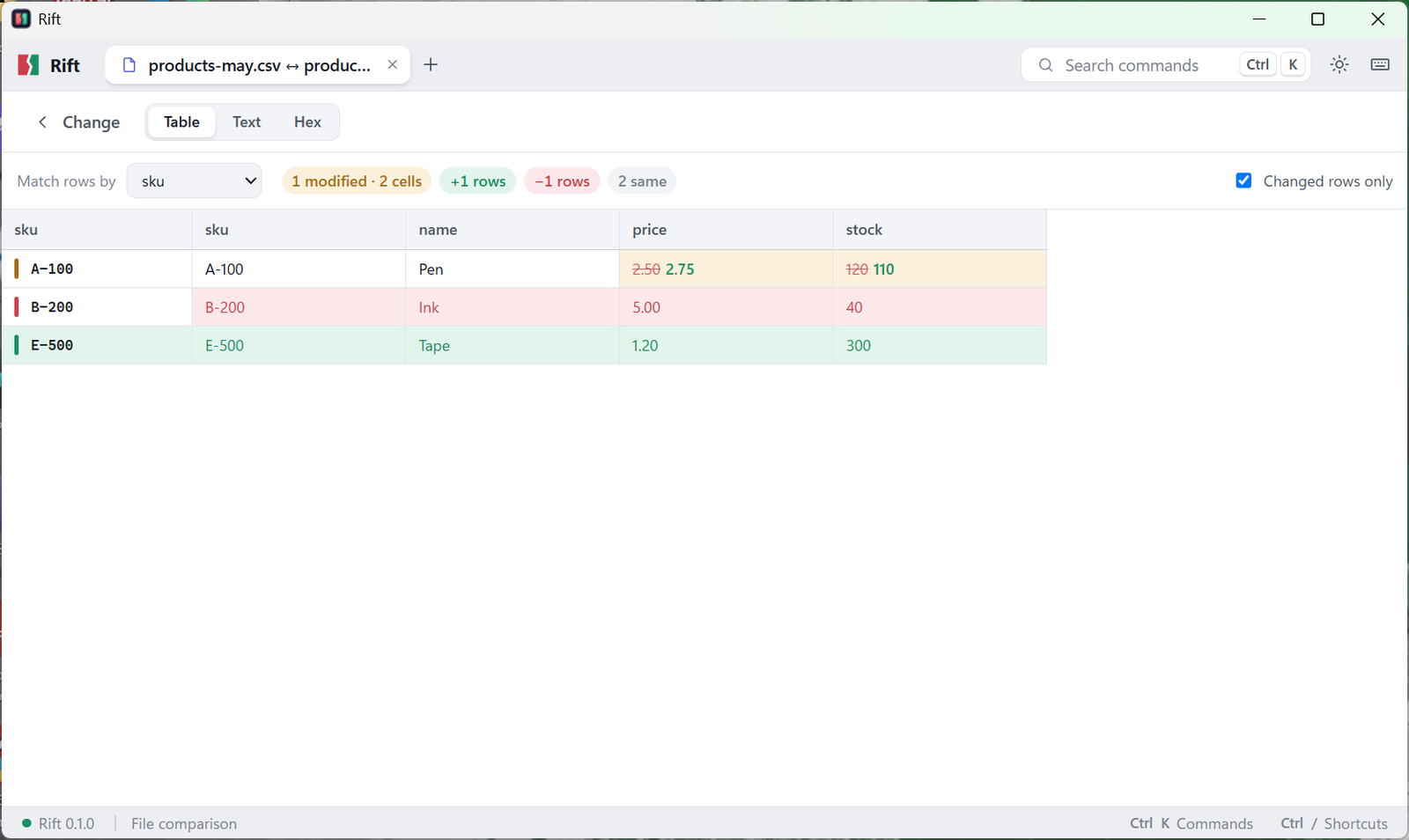
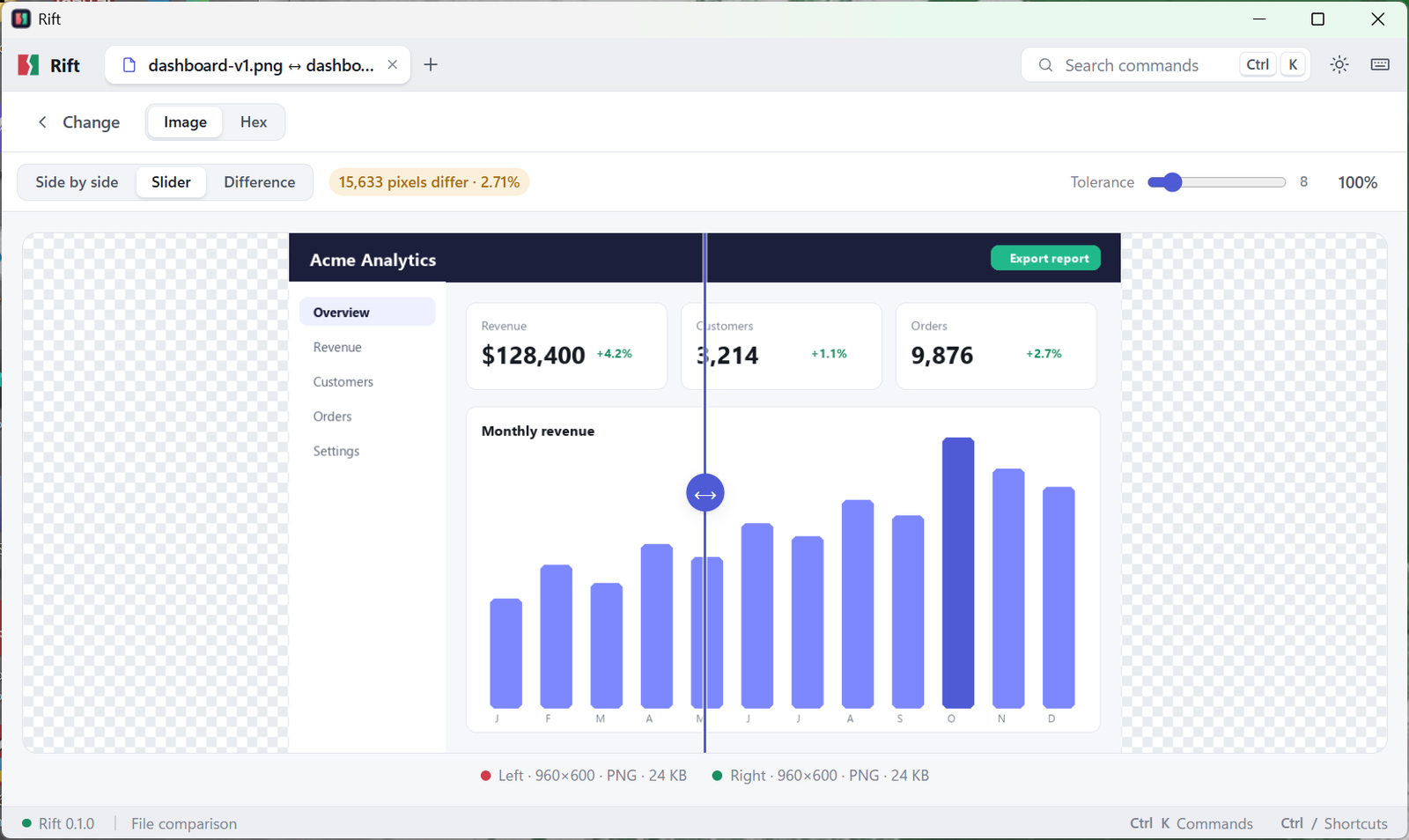
Images
For UI screenshots, design exports, icons and visual regression checks — see exactly what moved on screen, and how much.
Git & merge
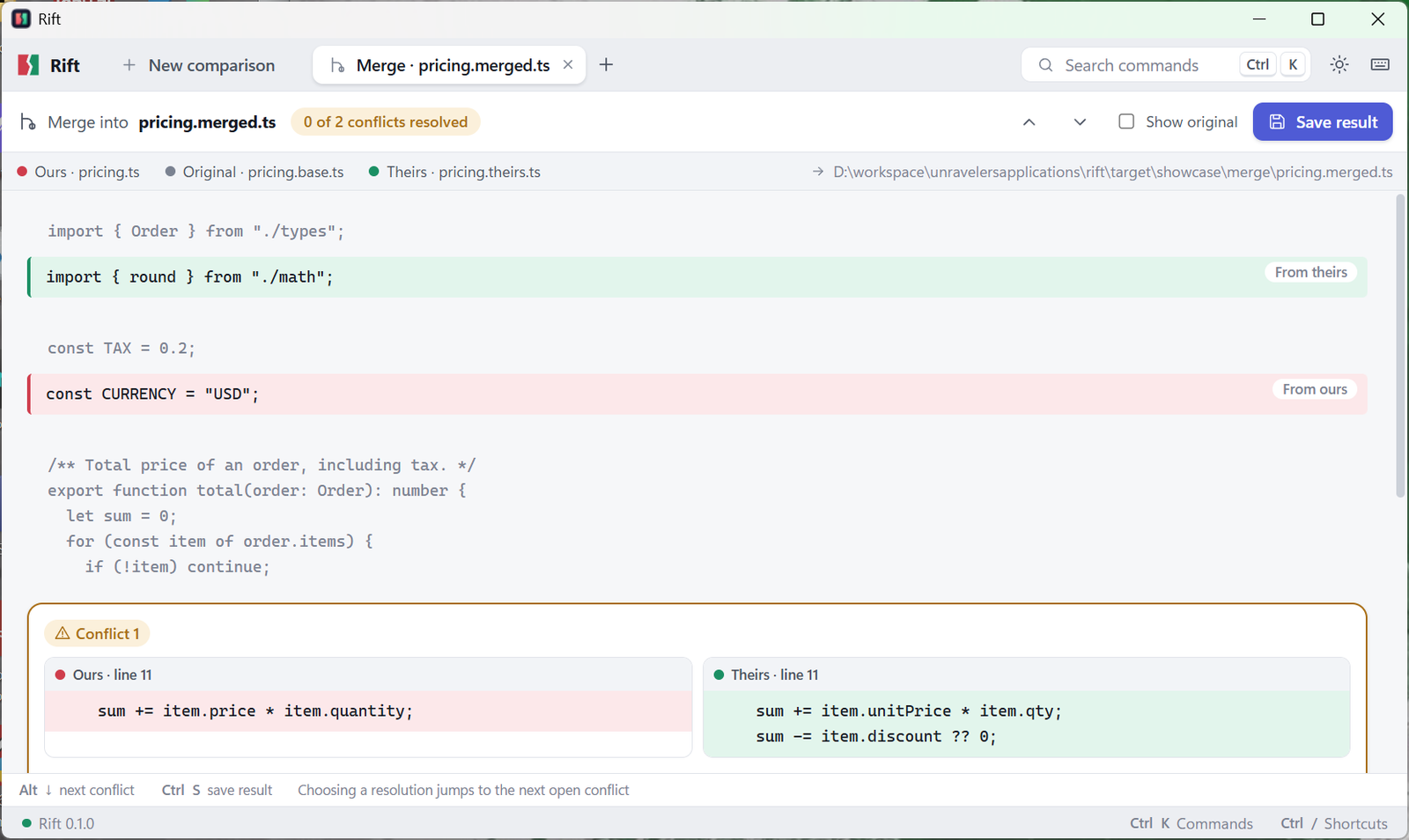
Rift merges everything it safely can, then walks you through each real conflict — ours and theirs side by side, and the original if you want it. Take one side, both, or edit by hand.
Gigabyte files, no problem
Rift reads large files straight from disk and only draws what's on screen, so a huge log or data dump scrolls as smoothly as a small one — without eating your RAM.
| Comparison | Time | Memory |
|---|---|---|
| Two 1 GB text files50 million lines each | 13 s | 46 MB |
| Two 100 MB text files5 million lines each | 1.3 s | 11 MB |
| Two folders100,000 files each | 1.0 s | — |
Memory is Rift's own working memory; the operating system may also cache the files it reads.
Archives open like folders
Compare ZIP, JAR, WAR, NuGet, wheel, TAR and TAR.GZ files as if they were folders — against each other, or against a real folder. Opened safely: entries that try to write outside their folder are refused, and archives that would expand to an unreasonable size are stopped.
For scripts and CI
Clear exit codes — 0 same, 1 different,
2 error — and JSON output for automation. Check that a build matches
what was released, that a config change touches only what it should, or that two data exports agree.
$ rift diff old/ new/ --exclude node_modules/
$ rift diff prices-may.xlsx prices-june.xlsx --key sku
$ rift diff src/app.ts --rev HEAD~3
$ rift merge base.txt ours.txt theirs.txt -o merged.txt
Made to be pleasant to use
Every action is in the command palette (Ctrl/⌘ K), with shortcuts to jump between changes and copy them across.
Double-click a line to change it, copy changes left or right, undo, and save — without leaving the comparison.
Themes that follow your system, so Rift looks at home at 9am and at midnight.
Windows, macOS (Apple silicon and Intel) and Linux — not a web page in a wrapper.
Your files stay on your computer
Rift runs entirely on your machine. Your source code, customer data and contracts are never sent anywhere — the only network request it makes is to check for updates. Safe to use on the files you can't share.
Who uses Rift
Coming next
Understands functions and classes, so a moved or renamed function is one change, not hundreds of lines.
See "the same edit in 200 files" once, instead of 200 times.
A readable summary of what changed — with an option to keep everything on your own machine.
Want a say in what comes first? Tell us.
Rift vs a typical diff tool
| Capability | Typical diff tool | Rift |
|---|---|---|
| Text files side by side | Yes | With word-level highlights |
| Moved & renamed files | Shown as deleted + added | Recognised as moved |
| Line-ending or encoding-only changes | Shown as changed | Marked "same content", with the reason |
| JSON / YAML / TOML / XML | Line by line | By meaning, key order ignored |
| Excel and CSV | Often not supported | Row by row, matched on a key |
| Images | Rarely | Slider, heatmap, changed area |
| ZIP / JAR / TAR | Sometimes | As folders — even against a real folder |
| Git history for any file or folder | Separate tool | Built in |
| Three-way merge | Sometimes | Guided, conflict by conflict |
| Gigabyte files | Often slow | 1 GB in 13 s, 46 MB of memory |
| Shared team rules | No | .riftrules in your project |
Get Rift 0.1.0
Pick the file for your system. We'll email you a one-time code, and the download starts as soon as you enter it.
Windows 10 and 11
macOS 11 Big Sur or later
64-bit
Put rift on your PATH
Verify your download (optional): each file's SHA-256 checksum is in SHA256SUMS.txt.
FAQ
Something else? Email jamal@unravelers.tech.
Windows 10 and 11, macOS 11 Big Sur or later on Apple silicon and Intel, and 64-bit Linux (.deb, .rpm or AppImage).
Yes. Two 1 GB files compare in about 13 seconds using under 50 MB of working memory, and they scroll as smoothly as small ones.
No. Every comparison happens on your computer — no account, no cloud. The only network request Rift makes is to check for updates.
Yes, as both git difftool and git mergetool. It can also compare any file or folder with any commit, branch or tag.
Yes. Save ignore patterns, excluded folders and comparison options to a .riftrules file in your project, and everyone who compares that project gets them.
Yes. rift works on its own, with exit codes (0 same, 1 different, 2 error) and JSON output for scripts and CI pipelines.
Yes — write to jamal@unravelers.tech for team licences, volume pricing or a demo.
Stop reading noise
Get Rift for Windows, macOS or Linux — or talk to us about team licences and a demo.