The reset link that points to localhost
It worked on your laptop. Your customer clicked http://localhost:8000/reset and got nothing.
01
MailCatch catches every email your app sends, right on your machine, so you see exactly what your users will get. Then it tells you what's wrong with it. Sign-up codes, password resets, invoices, newsletters: preview, check and test them before anyone else does.
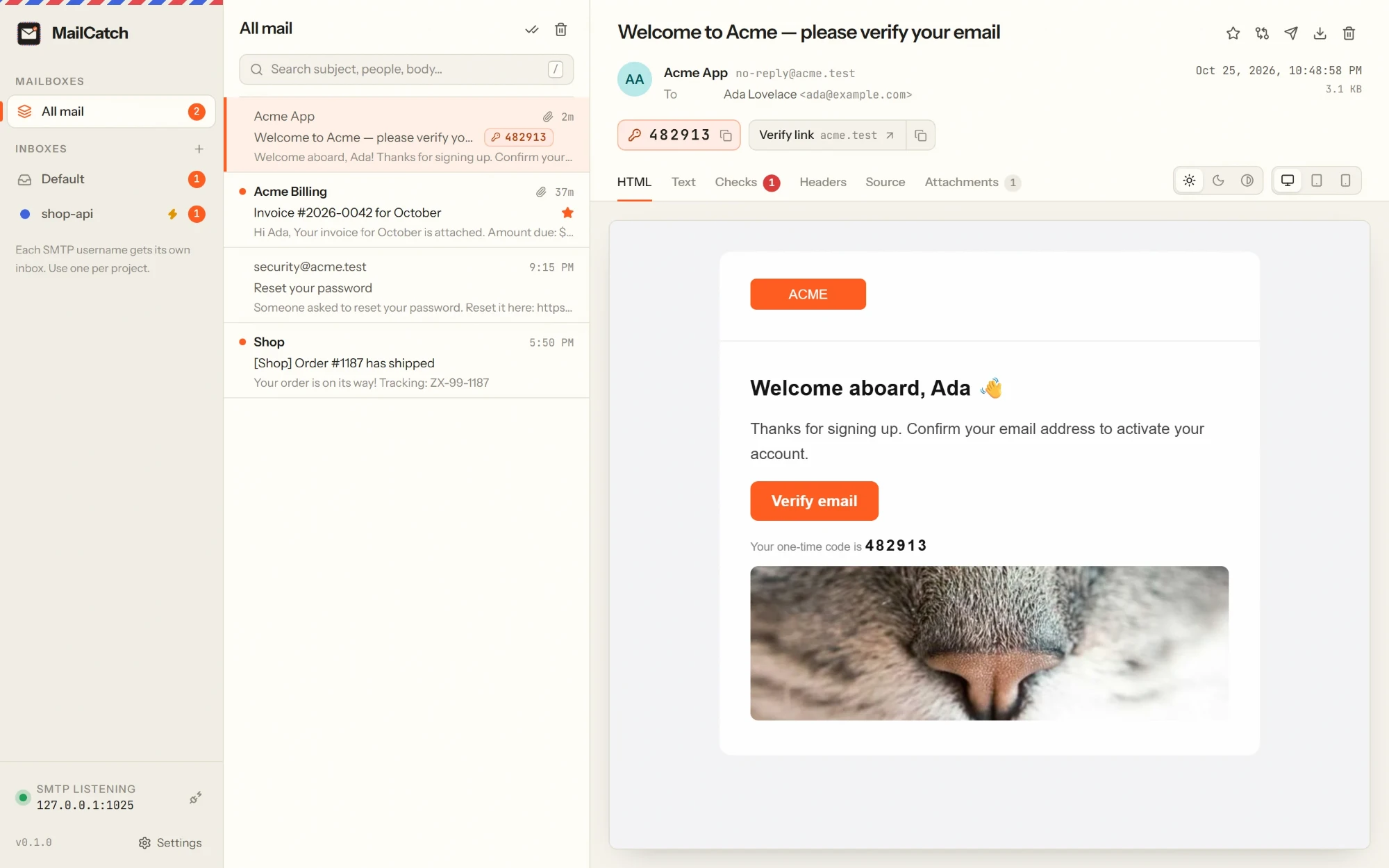
Email is the part of your app you can't see
During development you either send real emails to real people and hope, or you never look at them at all. MailCatch makes every email visible, checkable and testable before it matters.
It worked on your laptop. Your customer clicked http://localhost:8000/reset and got nothing.
01The welcome email that greeted a thousand new customers with an unfilled template tag.
02Over 102 KB of HTML and Gmail hides the rest: the total, the footer, the unsubscribe link.
03Rounded buttons turn square, layouts collapse, and dark mode makes your logo vanish.
04Set up in under a minute
It starts listening straight away. No account, no sign-up, no configuration file.
Host 127.0.0.1, port 1025, any username and password. That's the whole setup.
Every email your app sends appears in MailCatch the moment it's sent.
Ready-made settings built in for
# Laravel - or any framework that sends over SMTP
MAIL_MAILER=smtp
MAIL_HOST=127.0.0.1
MAIL_PORT=1025
MAIL_USERNAME=shop-api   # picks the inbox
MAIL_PASSWORD=anything

# That's it. Send an email and watch it land.
Built for the emails that matter
Find the code, catch the bug, see every screen size, and know exactly what a template change did.
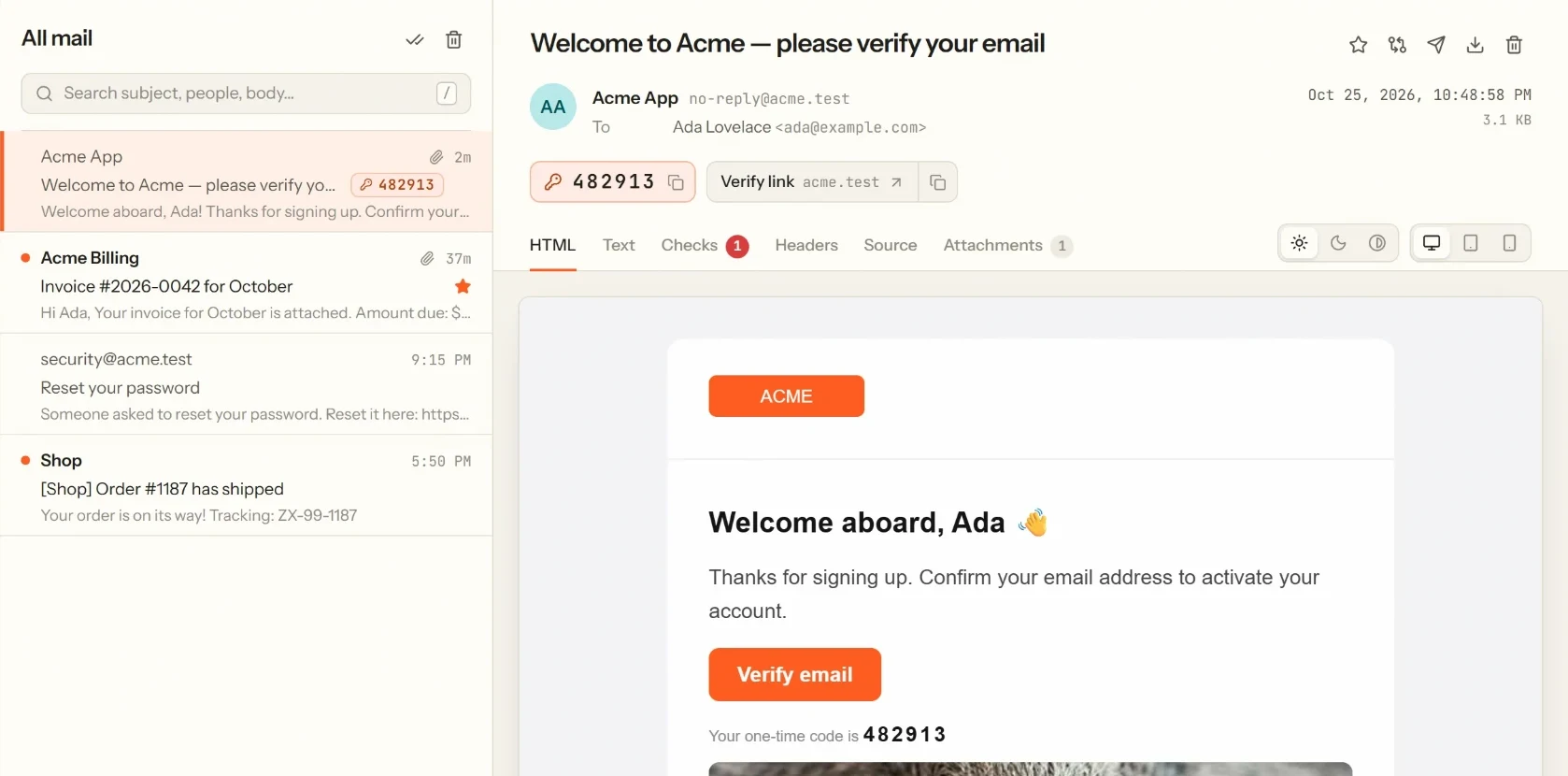
Sign-up & login testing
Testing sign-ups and logins means digging through emails for a six-digit code or a magic link. MailCatch finds them for you, so what used to take a minute of scrolling now takes one click.
Email health checks
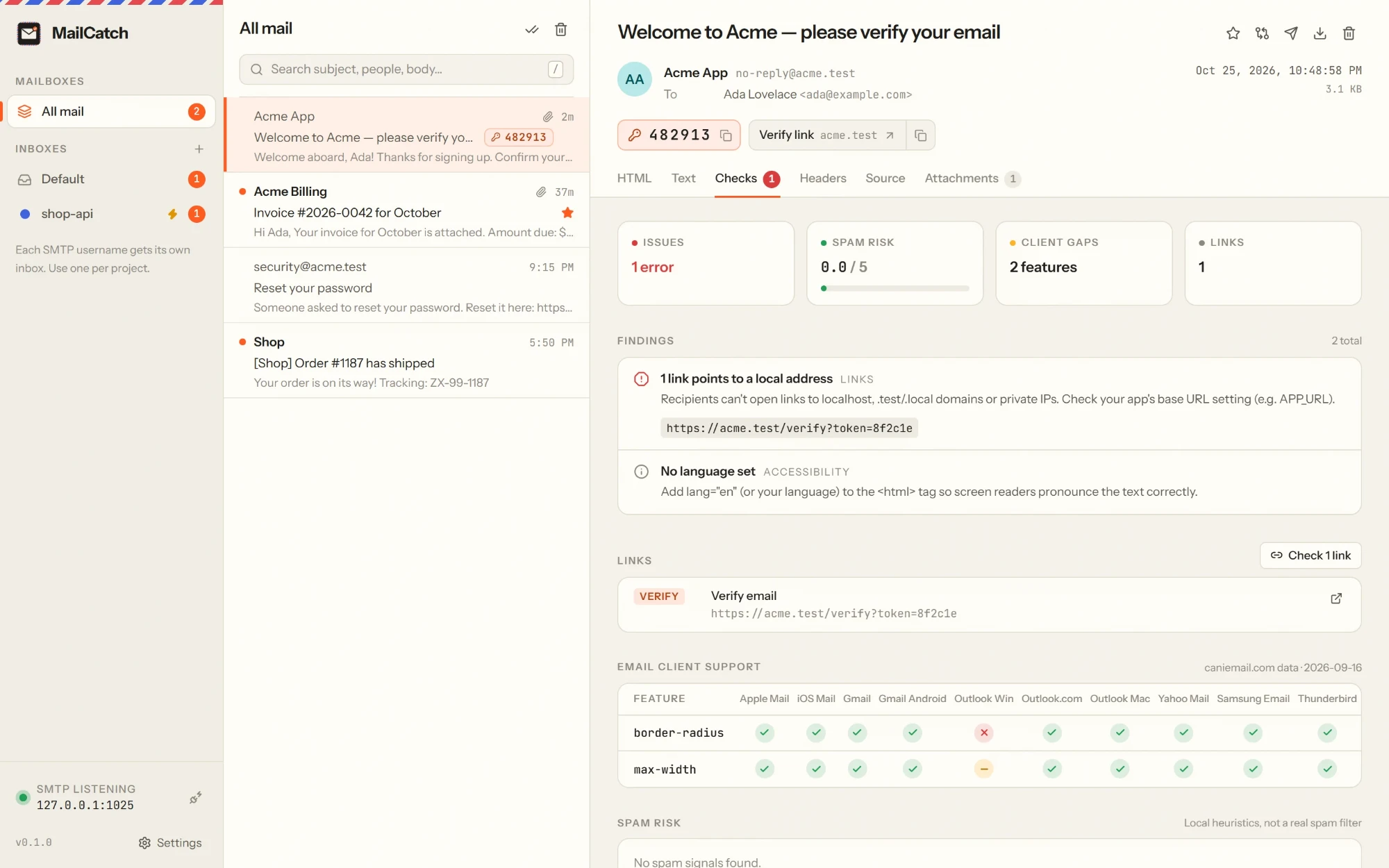
Every email gets an instant health check, entirely offline. MailCatch tells you what's wrong, why it matters, and how to fix it.
Client support is based on caniemail.com data: see which CSS and HTML features in your email won't work, and where.
Preview
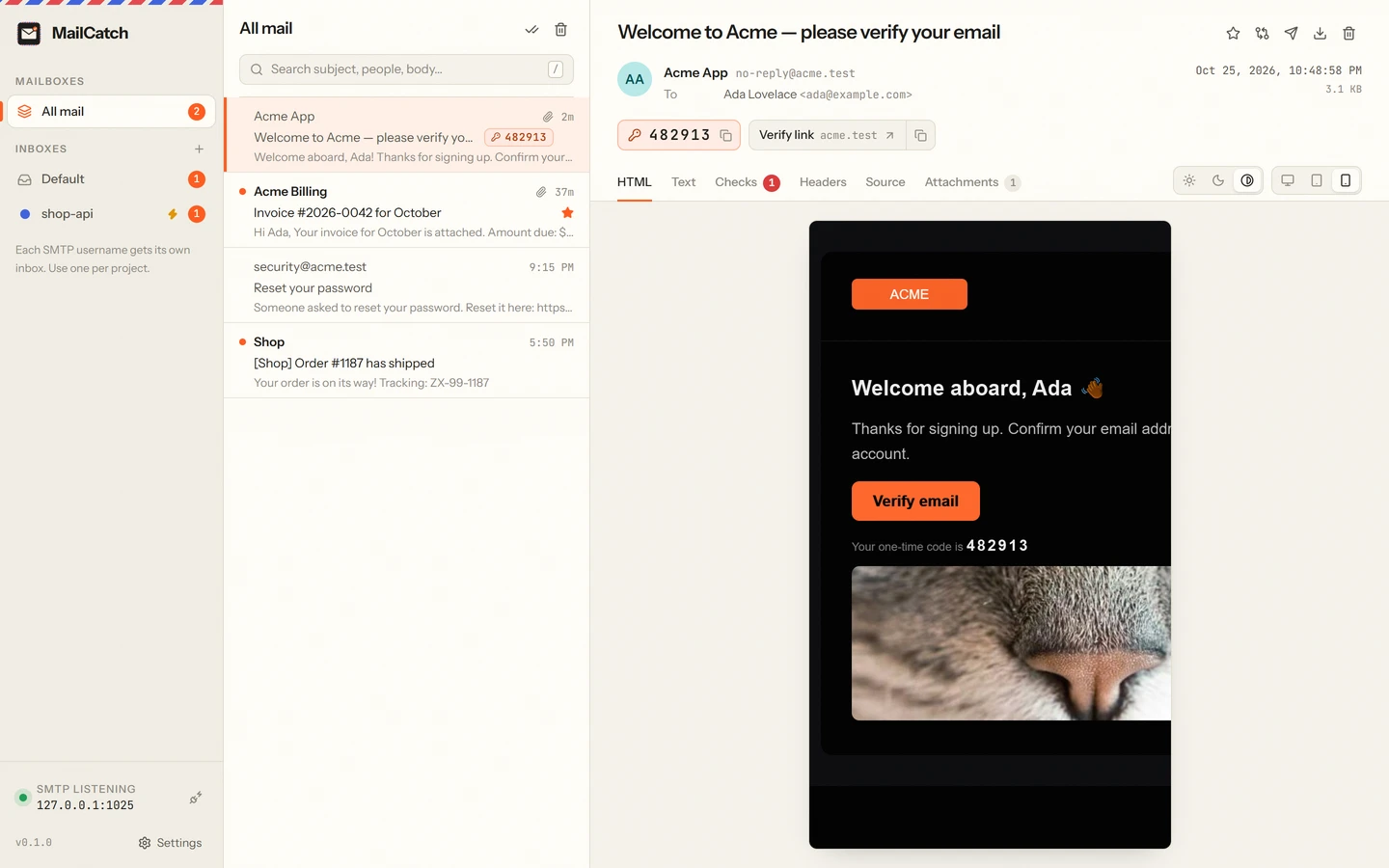
Your users read email on phones, in dark mode, with images blocked. Now you can too, before you ship.
Compare
Pick any two emails and MailCatch shows exactly what changed. Perfect for reviewing a template change before it ships.
  Subject  Welcome to Acme - please verify your email
- From     Acme <no-reply@acme.test>
+ From     Acme App <no-reply@acme.test>
  Size     3.0 KB → 3.1 KB

- <h1>Hi {{ first_name }},</h1>
+ <h1>Welcome aboard, Ada</h1>
  <p>Thanks for signing up.</p>
- <a href="http://localhost:8000/verify">
+ <a href="https://acme.com/verify">
Built for automated tests
Click "Send me a code", wait for the email, read the code, type it in. Three lines, in the
language you already test with, and no flaky sleep(5).
const mail = new MailCatch();
await page.click("text=Send me a code");
const message = await mail.waitFor({
  to: "ada@example.com",
  timeout: 30,
});
await page.fill("#code", message.otp_code);$ mailcatch serve # headless, for CI
$ mailcatch wait --to ada@example.com
$ mailcatch tail
$ mailcatch sendChaos mode · Break your email on purpose
Find out on your laptop instead of in production. Turn chaos mode on for one inbox and choose what goes wrong: extra latency, temporary failures, permanent rejections or dropped connections, at exactly the step you want to test. Then watch whether your app retries, and tells the user.
Everything else you'd expect
The SMTP username decides where mail lands, so every app or service keeps its own inbox, with names and colours.
Full-text search across subjects, addresses and bodies, and a list that stays fast with thousands of emails.
Keeps catching mail with the window closed, starts at login, and sends one tidy notification when a test suite sends fifty.
Need to see it in actual Gmail or Outlook? Forward any email through your own mail server, only to addresses you've allowed.
Read captured mail in Outlook, Thunderbird or Apple Mail over POP3.
Images, PDFs, text, CSV and JSON open inline. Messages up to 25 MB are accepted by default.
Keep a set number of messages per inbox, or delete them after a number of days.
Light and dark themes that follow your system, and shortcuts for everything you do often.
Private by design
Works with your stack
On Windows, macOS and Linux. No plugin, no SDK, no code change.
MailCatch vs testing with a real inbox
| Capability | A real inbox | MailCatch |
|---|---|---|
| Where the email goes | A real inbox, maybe a real customer's | Caught on your machine. Never delivered |
| Seeing the email | Log in to a mailbox and wait | Appears the instant it's sent |
| Sign-up codes & magic links | Open, scroll, select, copy | One click, right in the list |
| Broken templates & localhost links | Found by your customers | Flagged on every email |
| Dark mode & mobile | Borrow a phone | Desktop, tablet, mobile, two dark modes |
| Outlook & Gmail support | Guesswork | Feature by feature, per client |
| Automated tests | Polling a mailbox, sleep(5) | HTTP API, /wait, client libraries, CLI |
| Mail server failures | Wait for production | Chaos mode, on demand |
| Your test data | Stored on someone else's servers | Never leaves your computer |
| Price | Often per seat or per message | Free |
Get MailCatch 0.1.2 · Free
Pick the file for your system. We'll email you a one-time code (we test our emails too), and the download starts as soon as you enter it.
Windows 10 and 11, 64-bit
First launch & updates
If Windows shows "Windows protected your PC", choose More info → Run anyway. On Windows 10, the installer adds Microsoft's WebView2 if it's missing.
Download the newest version and install it over the old one. Your inboxes, captured emails and settings are kept.
The first-launch warning appears because MailCatch is new and not yet widely downloaded; it only shows once. Verify your download (optional): each file's SHA-256 checksum is in SHA256SUMS.txt.
FAQ
Something else? Ideas or partnership enquiries? Email jamal@unravelers.tech.
Yes. Download it and use it for as many projects as you like.
No. MailCatch catches every email and keeps it on your machine. The only way an email leaves is if you use Release and send it to an address you've added to your allow list.
No. Change your SMTP host and port to MailCatch's (usually 127.0.0.1 and 1025) in your development settings, the same way you'd configure any mail server.
Yes. Run the mailcatch serve command-line server on the CI machine, then use the HTTP API, the client libraries or mailcatch wait in your tests.
Each developer runs MailCatch on their own machine. For a shared staging or CI environment, run mailcatch serve on that machine and point the environment's SMTP settings at it.
Attachments are captured and previewable (images, PDFs, text, CSV, JSON), and can be opened or saved. Messages up to 25 MB are accepted by default; you can raise the limit.
In a folder on your computer, which you can open from Settings. Old messages can be cleaned up automatically.
Both systems double-check apps that aren't yet widely downloaded. It only happens on the first launch; the steps are in the download section above.
Windows 10 and 11 (64-bit), macOS 11 or later on Apple silicon and Intel, and 64-bit Linux (Ubuntu, Debian, Fedora, openSUSE and others).
Before your customers see it
MailCatch is free for Windows, macOS and Linux. Set up in under a minute, and never send a broken email again.